Docker Engine / Troubleshooting
Docker Container Has No Internet: Diagnose the Outbound Bridge Path
Separate container state, network mode, addressing, gateway, external IP reachability, and DNS when a running container on rootful Docker Engine bridge networking cannot reach external networks.
By Andrey Tretyak · Sources last reviewed
A running container can still lose external connectivity while the Docker host remains online. Treat its network attachment, address, default gateway, external IP reachability, and DNS as separate observations.[1]
On the default bridge, Docker documents outbound access through masquerading when the host has Internet access. If that expected path fails, locate the break before adding NAT rules or changing firewall policy.[1][2]
This page diagnoses outbound connectivity from the container toward the outside world. Inbound access from the LAN to a published host port is the opposite direction and belongs to the published-port diagnosis, even when both symptoms appear on the same host.[1][3]
Sections
Applicability
- Products
- Docker Engine
- Scope
- For rootful Docker Engine on Linux with bridge networking, where one running container cannot reach external IP or network destinations while the Docker host itself retains external connectivity. The container is expected to use a bridge network with masquerading toward the outside. This page does not cover containers that fail to start, DNS-only failure, published-port inbound access from the LAN, inter-container name resolution as a separate intent, host or none network mode, macvlan, ipvlan, overlay or Swarm, rootless Engine, or Docker Desktop, WSL, and macOS networking.[1][2][5]
- Last verified
Symptoms
- One running container cannot reach external network destinations or the Internet, while the Docker host itself retains external connectivity. The container may or may not have an address, and local or gateway destinations may or may not respond; each is a different observation.[1][2]
- Hostname lookups may also fail, but a failing hostname alone does not establish a general connectivity failure. When external IPs are reachable and only names fail, the DNS-specific diagnosis applies instead.[1]
Quick diagnosis
Confirm the failing direction first. A present address never proves the external path works.
Confirm this page applies before diagnosing
Confirm a Linux host with rootful Docker Engine, a running container expected on a bridge network, and working external connectivity from the host itself. If the symptom is LAN access to a published port, a DNS-only failure, a non-running container, or a non-bridge network mode, stop and use the matching diagnosis instead.[1][5]
Record the container network attachment
Record which network or networks the container is attached to and the intended design. A container can be connected to multiple Docker networks, and the default gateway is selected from them, so record every attachment before drawing conclusions about the path.[1][6]
docker network inspect <network>Capture container addressing from the Docker side
Capture the container network settings from Docker-side inspection first. Prefer Docker-side metadata over commands executed inside the container, because minimal images may not contain common networking utilities at all.[9][6]
docker inspect <container>Interactive troubleshooter
Your answers stay in this browser tab. The tool does not connect to your systems or send diagnostic results.
Guided check / step 1
Which direction fails?
Outbound container connectivity and inbound published-port access are opposite directions. Establish the failing direction first.[1][3]
Read the complete diagnostic tree without using the controls
- Which direction fails?
Outbound container connectivity and inbound published-port access are opposite directions. Establish the failing direction first.[1][3]
- Container cannot reach outside → Does the container stay running?
- LAN cannot reach a published port → This is a published-port observation, not outbound failure
- I have not established this → Establish the failing direction
- Establish the failing direction
Record whether the failing request travels from the container toward the outside world or from a LAN client toward a published host port.[1][3]
- What did the direction check show?
Only outbound container failures continue on this page.[1]
- Container cannot reach outside → Does the container stay running?
- LAN cannot reach a published port → This is a published-port observation, not outbound failure
- This is a published-port observation, not outbound failure
A service reachable locally but not from another LAN device needs the published-port diagnosis, which compares the working local endpoint with the failing LAN endpoint. Do not apply outbound bridge repair paths to it.[3]
- Does the container stay running?
A container that does not stay running never reaches network-path diagnosis.[1]
- Yes, it runs but reaches nothing outside → Which network mode does the container use?
- No, it does not stay running → This is a container lifecycle problem, not a network path
- I have not checked → Check the container running state
- Check the container running state
Record whether the container starts and stays running before any network observation.[1]
- What did the running-state check show?
Only a running container continues on this page.[1]
- It runs but reaches nothing outside → Which network mode does the container use?
- It does not stay running → This is a container lifecycle problem, not a network path
- This is a container lifecycle problem, not a network path
A container that does not stay running needs lifecycle diagnosis, not bridge or gateway checks. Preserve the state and log output and use the matching workflow.[1]
- Which network mode does the container use?
Establish the network mode before any bridge-specific conclusion. A container can attach to multiple networks, including networks using different drivers, so record every attachment; the effective outbound path is established at the egress gate later. Non-bridge modes follow different connectivity models.[1][5]
- Bridge (default or user-defined) → Is the container attached to the expected bridge network?
- Host, none, or another driver → Non-bridge modes need their own diagnosis
- I have not checked → Record the container network mode
- Record the container network mode
Record the network mode from Docker-side inspection before any bridge-specific step.[9][5]
- What did the mode check show?
Only bridge attachments continue on this page.[1]
- Bridge (default or user-defined) → Is the container attached to the expected bridge network?
- Host, none, or another driver → Non-bridge modes need their own diagnosis
- Non-bridge modes need their own diagnosis
Host, none, macvlan, ipvlan, overlay, rootless, and Docker Desktop networking do not share the rootful bridge masquerading path. Record the mode and use the matching diagnosis; do not apply bridge repair steps and never change the network mode as a test.[1][5]
- Is the container attached to the expected bridge network?
Compare the intended bridge network against the actual attachment, recording every attachment because a container can use several networks. The effective outbound path is established at the egress gate later, not here.[1][6]
- Yes, attached as intended → Does the container have a live address?
- No, wrong network or no attachment → Resolve the attachment gap with the deployment owner
- I have not checked → Compare intended and actual attachment
- Compare intended and actual attachment
Record the intended bridge network and the actual container attachment side by side.[6]
- What did the attachment comparison show?
A wrong or missing attachment is an assignment gap, not an upstream outage.[6]
- Attached as intended → Does the container have a live address?
- Wrong network or no attachment → Resolve the attachment gap with the deployment owner
- Resolve the attachment gap with the deployment owner
Without the intended attachment, gateway and external tests cannot localize the fault. Record the intended network, the actual attachment, and the live address state, and hand those observations to the deployment owner. Do not connect, disconnect, or recreate networking as a probe.[6]
- Does the container have a live address?
Compare the attachment with live address state. A present address continues to path checks; it never by itself declares external connectivity healthy.[6][9]
- Yes, an address is present → Which design provides the default outbound path?
- No, no address is present → Resolve address assignment before path checks
- I have not checked → Compare attachment with live addressing
- Compare attachment with live addressing
Record the network attachment and the live address state side by side.[6]
- What did the address comparison show?
A configured attachment that yields no live address is an assignment gap, not an upstream outage.[6]
- An address is present → Which design provides the default outbound path?
- No address is present → Resolve address assignment before path checks
- Resolve address assignment before path checks
Without a live container address, gateway and external tests cannot localize the fault. Investigate attachment and address assignment first; do not change filtering, forwarding, or upstream configuration yet.[6][2]
- Which design provides the default outbound path?
Identify the intended and effective egress network, then record the applicable gateway or default path. An internal network intentionally restricts external access. With multiple attachments, the default gateway can change when attachments change. Bridge masquerading is the default behavior, but user-defined external-connectivity options can alter it, so bridge attachment alone does not prove masqueraded egress is intended. Do not change gateway priority as a probe.[1][2][8][6]
- Single bridge, external access expected → Can the container reach an external destination by IP?
- Internal network by design → Internal isolation may be intentional — not a fault
- Multiple networks, bridge egress established → Can the container reach an external destination by IP?
- Effective egress unclear or unknown → Establish the egress design before any verdict
- Effective egress is non-bridge → Non-bridge modes need their own diagnosis
- Internal isolation may be intentional — not a fault
A network created as internal intentionally restricts external access while containers on it can still communicate inside that network. Missing Internet here reflects the documented design, not a broken bridge path. Do not diagnose this as filtering or upstream failure, and do not remove the internal restriction as a diagnostic test.[8][1]
- Establish the egress design before any verdict
With multiple attachments or a custom design, the effective default outbound path cannot be established from the available evidence. Record every attachment, the applicable gateway or default path, and the intended design, and hand those observations to the deployment or network owner. Do not guess which network should provide egress and do not apply bridge repair steps.[1][6]
- Can the container reach an external destination by IP?
With a supported bridge egress design established, test an external destination by IP before any hostname. IP success with failing hostnames isolates the DNS layer; IP failure keeps the investigation at gateway, filtering, or upstream layers.[1]
- No, external IPs fail → Continue at gateway, filtering, and upstream layers
- IPs work, hostnames fail → IP path works — continue with DNS diagnosis
- Everything works now → Record the evidence while the path works
- I have not tested it → Test an external destination by IP
- Test an external destination by IP
Use detailed step 5 for a bounded host/container comparison at a known address. Confirm its prerequisites first. A missing utility, TLS error or an untested destination is not a demonstrated routing failure; stop and record the uncertainty if no interpretable result is available.[1]
- What did the external IP test show?
Separate IP reachability from name resolution before any conclusion.[1]
- External IPs fail → Continue at gateway, filtering, and upstream layers
- IPs work, hostnames fail → IP path works — continue with DNS diagnosis
- Everything works now → Record the evidence while the path works
- Continue at gateway, filtering, and upstream layers
With a supported bridge egress design established, the container attached and addressed, but external IPs failing, continue at gateway behavior, packet-filtering and forwarding evidence, and the upstream path. This conclusion is only valid because the egress gate confirmed external access is expected. The host having Internet access never proves the container forwarding path works. Collect evidence without changing policy, and distinguish the filtering backend in use.[4][2]
- IP path works — continue with DNS diagnosis
Reachable external IPs with failing hostnames isolate the DNS layer. Continue with the container DNS diagnosis, which separates default-bridge and user-defined-bridge resolver behavior. Do not treat this as a general connectivity failure.[1]
- Record the evidence while the path works
A currently working path cannot confirm the earlier failure is resolved. Record attachment, addressing, gateway behavior, and the exact test that failed before, and monitor for recurrence instead of changing configuration.[6]
Detailed diagnosis
1. Establish that the container runs
A container that fails to start is a lifecycle problem, not a network-path problem. Confirm the running state first; only a running container continues on this page.[1]
2. Establish the network mode before bridge logic
Establish which network mode the container uses before any bridge-specific conclusion. Host, none, macvlan, ipvlan, overlay, rootless, and Docker Desktop networking follow different models and must never follow a Linux rootful bridge or NAT repair path.[1][5]
docker inspect <container>3. Separate configured attachment from live addressing
Compare the container network attachment with live address state. A present address continues to path checks and never by itself declares external connectivity healthy.[6][9]
docker network inspect <network>4. Establish the effective egress design
Record every network attachment and identify which one provides the default outbound path. An internal network intentionally restricts external access, while multiple attachments can change which gateway becomes default. Bridge masquerading is the default bridge behavior, but user-defined external-connectivity options can change that model; bridge attachment alone does not prove masqueraded egress is intended.[1][2][8][6]
docker network inspect <network>5. Compare one known destination from the host and container
For an HTTPS endpoint you may probe, obtain its operator-confirmed IPv4 address. This example requires curl already installed on the Docker host and in the running container, and a direct path without a configured proxy. Replace every placeholder. If these prerequisites are missing, record the limitation; do not install tools or bypass a required proxy for this check.[10][11]
Run the first command on the Docker host, then the second against the container. Both pin the address while retaining the HTTPS hostname and certificate checks. Record the time and actual response or error for each location. The time limits bound the probes, not acceptable service latency.[11][10]
Host receives HTTP headers but container fails: investigate the container path for this endpoint. Both fail: host connectivity to this endpoint is unconfirmed. Both receive headers: compare normal hostname lookup using the related DNS guide if the application still fails. A certificate error or missing executable is not proof of broken routing; retain the exact error without disabling TLS verification.[11][1]
curl --head --connect-timeout 5 --max-time 15 --resolve '<hostname>:443:<verified-ipv4>' 'https://<hostname>/'docker exec <container> curl --head --connect-timeout 5 --max-time 15 --resolve '<hostname>:443:<verified-ipv4>' 'https://<hostname>/'6. Compare against the host path before filtering changes
With local path observations confirmed but external IPs failing, compare against the host external path and collect packet-filtering and forwarding evidence. The host having Internet access never proves the container forwarding and filtering path works.[4][2]
Supported scenarios
These observations narrow the next investigation; they do not establish a unique cause.
The container does not stay running
A container that fails to start never reaches network-path diagnosis. Lifecycle, image, storage, or resource faults precede any path observation.[1]
How to check: Confirm the running state before any network check.[1]
The container does not use bridge networking
Host, none, macvlan, ipvlan, overlay, rootless, and Docker Desktop networking follow different connectivity models. Bridge masquerading expectations do not apply to them.[1][5]
How to check: Record the container network mode from Docker-side inspection before any bridge-specific step.[9][5]
The container has no live address on its network
An attachment without a live address indicates an assignment or attachment gap rather than an upstream outage. The configured attachment and the live state must be compared explicitly.[6][2]
How to check: Compare network attachment against live address output.[6]
The network intentionally restricts external access
A network created as internal intentionally restricts external access while containers on it can still communicate inside that network. Missing Internet on such a network is the documented design, not a broken path. Removing the internal restriction as a diagnostic test is not permitted.[8][1]
How to check: Record whether any attachment is an internal network before judging external reachability.[8][6]
The effective egress path cannot be established
With multiple attachments or an undocumented custom design, the effective default outbound path may be unknowable from the available evidence. Guessing which network should provide egress leads to the wrong repair path.[1][6]
How to check: Record every attachment and the applicable gateway or default path; if the effective egress stays unclear, hand off instead of guessing.[1][6]
Local path works but external IPs fail
Working local observations with failing external destinations narrow the investigation to gateway behavior, packet filtering and forwarding, masquerading design, or the upstream path. This conclusion is only valid after the egress gate confirms a supported bridge path with external access expected. A responding gateway never proves external forwarding.[2][4]
How to check: Confirm local and gateway observations and the established egress design first, then collect filtering and forwarding evidence without changing policy.[4]
Only hostname resolution fails
Reachable external IPs with failing hostnames isolate the DNS layer. Treating that observation as a general connectivity failure leads to the wrong repair path.[1]
How to check: Test an external destination by IP; if it succeeds while names fail, continue with the DNS-specific diagnosis.[1]
The actual failure is inbound published-port access
A service that works from the container or host-local context but cannot be reached from another LAN device is an inbound published-port observation, not an outbound container connectivity failure.[3]
How to check: Record the direction of the failing request: container toward outside versus LAN client toward published host port.[3]
Next actions and procedure boundaries
Hand off an attachment gap with evidence
If inspection shows the container is attached to the wrong network or has no live address, record the intended network, the actual attachment, and the live address state, and provide those observations to the deployment owner. This page supplies no attach, connect, or recreate command.[6][7]
Hand off a filtering or forwarding finding with evidence
If evidence narrows the fault to packet filtering or forwarding, record the backend in use, the observed behavior, and the exact scope, and provide those observations to the host or network owner. Do not flush rules, change the default policy, add masquerading, or disable any firewall as a probe.[4]
Before any separately authorized network change
Before changing anything
- Risk
- A network, daemon, or firewall change can interrupt running workloads and alter host exposure.[4]
- Safer check
- Confirm the failing layer with the observations above and ensure independent host management access exists before considering a change.[6]
- Expected result
- A scoped plan should state which container path should start working and which other paths must remain unaffected; verify both after any separate change.[4]
- Backup / recovery access
- HomeLabFix requires saved deployment and network settings, confirmed persistent-data recovery, and independent host management access before disruptive work.[4]
- Rollback
- There is no universal rollback recipe here. The owner must verify restoration of the prior deployment and policy for this installation; if recovery is not established, stop.[4]
Planning boundary only: connecting, disconnecting, or recreating container networking, changing daemon or firewall configuration, and restarting Engine or the host can interrupt workloads. The responsible deployment and network owner must approve the exact change; this page supplies no mutation command.[4][7]
Escalate a design mismatch with evidence
When observations show the container network design does not match the site design, keep the container configuration intact, record attachment, addressing, gateway behavior, and filtering scope, and escalate to the network owner. Do not convert one network mode or driver into another as a probe.[1][2]
Warnings and boundaries
Virtual lab test
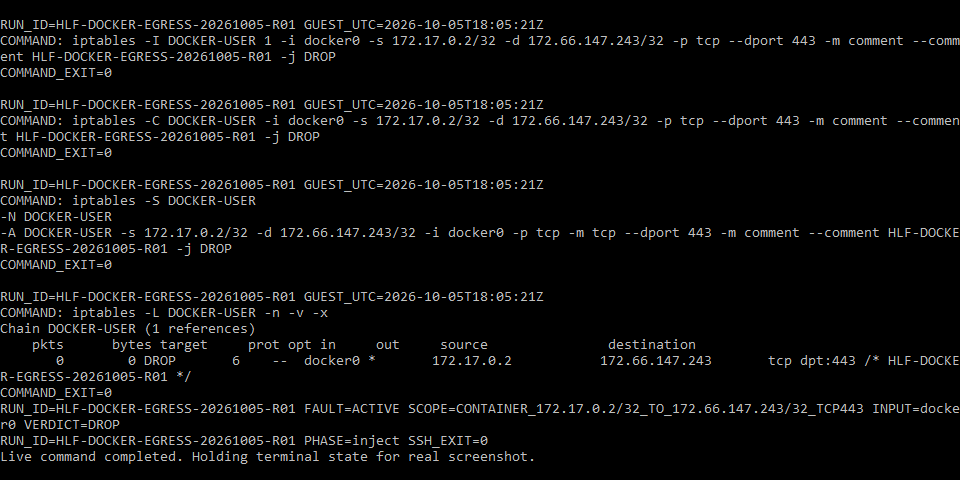
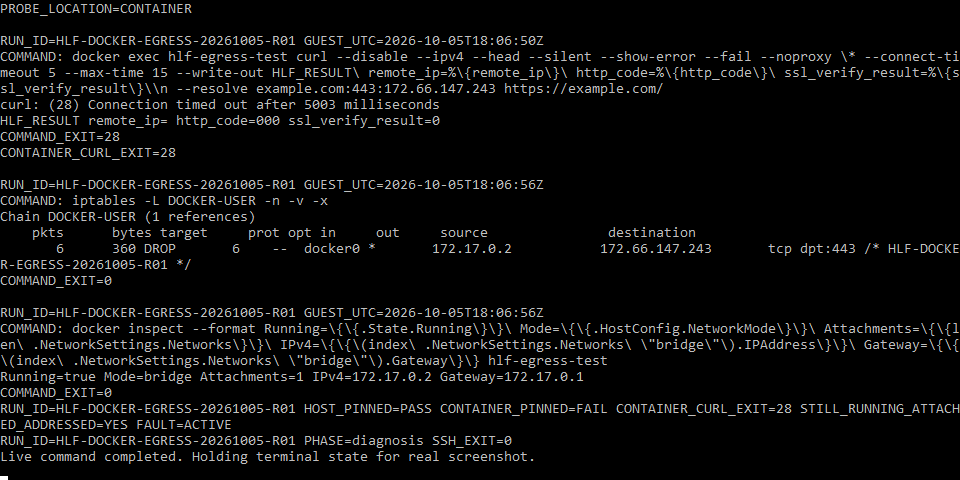
Run HLF-DOCKER-EGRESS-20261005-R01 tested one specific diagnostic distinction from this page. The evidence below shows the topology, measured before/during/after states, and the strongest terminal captures rather than treating screenshots alone as proof.
- Status
- Virtual Lab Tested
- Tested
- Environment
- Debian 12.15 VM on QEMU 11.1.0 with rootful Docker Engine 29.8.2, the default bridge network, and Docker's iptables-compatible filtering path through iptables-nft. Host curl was 7.88.1 and container curl was 8.22.0.
Test topology
Host control path
Container path under test
Measured results
| Probe | Baseline | Fault active | Recovery |
|---|---|---|---|
| Docker host pinned HTTPS | HTTP 200 | HTTP 200 | HTTP 200 |
| Same bridge container pinned HTTPS | HTTP 200 | curl 28 / HTTP 000 | HTTP 200 |
| Controlled rule counter | — | 0 → 3 packets; 6 after repeated diagnosis | Rule removed |
What this experiment shows
- Host connectivity and container connectivity diverged while the endpoint, hostname, pinned IPv4 and TCP port stayed fixed.
- The container remained running, attached to the same bridge and addressed at 172.17.0.2 while only its selected outbound path failed.
- The controlled DROP counter increased during the failure, tying the timeout to the injected filtering rule.
- Removing only that rule restored the same container's request without recreating the container.
Key evidence captures
What this does not prove
This reproduces the host-versus-container address-pinned HTTPS discriminator under one artificial, narrowly scoped filtering fault. It does not validate every cause of Docker outbound failure, every firewall backend, Docker Desktop, WSL, rootless Docker, non-bridge drivers, IPv6-only paths, physical routers, or unrelated production incidents.
The complete reviewed bundle includes the full command logs, recovery evidence, additional captures, environment details, and integrity hashes. This article shows only the evidence that helps explain the diagnostic result.
Editorial verification
The citations beside technical claims show their evidence. HomeLabFix chooses the diagnostic order and states where the evidence stops supporting a conclusion.
- Author and technical editor
- Andrey Tretyak
- Verification basis
- The cited vendor or project documentation plus the page-specific reasoning above.
- Hands-on status
- A scoped virtual-lab reproduction is documented above. Other claims remain documentation- and reasoning-based unless separately tested.
- Lab verification
- Virtual Lab Tested · run HLF-DOCKER-EGRESS-20261005-R01 · · See topology, measurements, evidence captures, and scope.
- Correction path
- Report a source change, scope error, or reproducible contradiction.
Sources
Links were reviewed on 2026-10-05. Reachability and automated validation do not replace editorial verification of each claim.
- Networking overview
Docker · Tier A · accessed 2026-09-11 - Bridge network driver
Docker · Tier A · accessed 2026-09-11 - Port publishing and mapping
Docker · Tier A · accessed 2026-09-05 - Packet filtering and firewalls
Docker · Tier A · accessed 2026-09-05 - Host network driver
Docker · Tier A · accessed 2026-09-05 - docker network inspect
Docker · Tier A · accessed 2026-09-11 - docker network connect
Docker · Tier A · accessed 2026-09-11 - docker network create
Docker · Tier A · accessed 2026-09-11 - docker inspect
Docker · Tier A · accessed 2026-09-11 - docker container exec — run a command in a running container
Docker · Tier A · accessed 2026-09-27 - curl manual — resolve, HEAD, time limits, proxy environment and exit codes
curl project · Tier A · accessed 2026-09-27