Docker Engine / Troubleshooting
Docker Container DNS Not Working: Separate IP Path from Name Resolution
Confirm the IP path first, then separate default-bridge and user-defined-bridge resolver behavior when a container reaches external IPs but hostname resolution fails.
By Andrey Tretyak · Sources last reviewed
A failing hostname with working external IPs is a DNS-layer observation, not a general connectivity failure. Confirm the IP path first; only then does resolver diagnosis begin.[1]
Resolver behavior depends on the bridge type. Containers that attach to the default bridge network receive a copy of the host resolver file, while containers that attach to a custom network use the embedded DNS server, which forwards external lookups to the DNS servers configured on the host. The two cases must never be diagnosed with the same expectations.[1][2]
Custom DNS settings change this picture further. Per-container DNS flags and daemon-level DNS settings, documented under the daemon DNS options, alter which resolvers answer, so establish whether custom DNS is configured and where before blaming any resolver component.[1][6]
Sections
Applicability
- Products
- Docker Engine
- Scope
- For rootful Docker Engine on Linux with bridge networking, where a running container reaches external destinations by IP but hostname resolution fails. The container may use the default bridge or a user-defined bridge network, and those two cases follow different resolver behavior. This page does not cover general connectivity failure with failing IPs, published-port inbound access, host or none network mode, macvlan, ipvlan, overlay or Swarm, rootless Engine, or Docker Desktop, WSL, and macOS networking.[1][2][7]
- Last verified
Symptoms
- The container reaches an external destination by IP address, but the same or comparable destinations fail by hostname. The IP evidence must be recorded; an untested IP path does not establish a DNS-only failure.[1]
- The failure may affect every hostname or only specific names. A single failing name with working general resolution makes a total resolver outage less likely and the investigation name, query, and path specific, without proving the resolver healthy or assigning a unique root cause.[1]
Quick diagnosis
Confirm the IP path first. Failing hostnames with working IPs isolate the DNS layer.
Confirm the IP path before DNS work
Use the same-container comparison in detailed step 1 if you do not already have a recorded IP-path result. Record the destination, time and result. A test from the Docker host alone does not establish the container path. If IP connectivity also fails, continue with the container connectivity diagnosis.[1][8]
Record default bridge versus user-defined network
Record whether the container uses the default bridge network or a user-defined bridge network. Resolver expectations differ between the two: user-defined bridge networks provide automatic Docker DNS resolution of container names and aliases, which the default bridge does not provide in the same way.[1][2][4]
docker network inspect <network>Record the resolver configuration in effect
Record the resolver configuration the container actually uses and whether custom DNS is configured at container or daemon level. An assumed resolver is not an observed one.[1][5]
docker inspect <container>Interactive troubleshooter
Your answers stay in this browser tab. The tool does not connect to your systems or send diagnostic results.
Guided check / step 1
Is the IP path confirmed working?
DNS-only diagnosis requires recorded external-IP success. Without it, the symptom is unclassified.[1]
Read the complete diagnostic tree without using the controls
- Is the IP path confirmed working?
DNS-only diagnosis requires recorded external-IP success. Without it, the symptom is unclassified.[1]
- Yes, external IPs work, names fail → Which network mode does the container use?
- No, IPs fail or were never tested → Confirm the IP path first
- I have not established this → Test an external destination by IP
- Test an external destination by IP
Use detailed step 1 for the same-container HTTPS comparison and its prerequisites. Keep the hostname unchanged and use only an operator-confirmed destination address. If the probe cannot run, choose the unconfirmed result rather than guessing that DNS is at fault.[8][9]
- What did the IP test show?
Only confirmed IP success with failing names continues on this page.[1]
- External IPs work, names fail → Which network mode does the container use?
- External IPs fail or were never tested → Confirm the IP path first
- Confirm the IP path first
Without recorded external-IP success, continue with the container connectivity diagnosis, which separates attachment, addressing, gateway, and external path layers. Resolver work built on an untested IP path misdirects the repair.[1]
- Which network mode does the container use?
Establish the network mode before any bridge resolver expectations. Non-bridge modes follow different models.[1][7]
- Bridge (default or user-defined) → Default bridge or user-defined bridge?
- Host, none, or another driver → Non-bridge modes need their own diagnosis
- I have not checked → Record the container network mode
- Record the container network mode
Record the network mode from Docker-side inspection before any resolver step.[5][7]
- What did the mode check show?
Only bridge attachments continue on this page.[1]
- Bridge (default or user-defined) → Default bridge or user-defined bridge?
- Host, none, or another driver → Non-bridge modes need their own diagnosis
- Non-bridge modes need their own diagnosis
Host, none, macvlan, ipvlan, overlay, rootless, and Docker Desktop networking do not share bridge resolver behavior. Record the mode and use the matching diagnosis; never apply bridge resolver expectations and never change the network mode as a test.[1][7]
- Default bridge or user-defined bridge?
Default-bridge containers receive a copy of the host resolver file; user-defined-network containers use the embedded DNS server. The default bridge does not provide the same automatic container-name DNS behavior as user-defined bridges.[1][2]
- Default bridge network → Is custom DNS configured?
- User-defined bridge network → Is custom DNS configured?
- I have not checked → Record which bridge the container uses
- Record which bridge the container uses
Record the container network attachment and whether it is the default bridge or a user-defined network.[4][2]
- What did the bridge check show?
Resolver expectations follow the bridge type actually in use.[2]
- Default bridge network → Is custom DNS configured?
- User-defined bridge network → Is custom DNS configured?
- Is custom DNS configured?
Establish whether custom DNS is configured at container or daemon level before blaming any resolver component.[1]
- Yes, custom DNS is configured → Investigate the custom resolver, not the default path
- No custom DNS → Do all hostnames fail or only specific names?
- I have not checked → Inspect the resolver configuration in effect
- Inspect the resolver configuration in effect
Record the resolver configuration the container actually uses and any custom DNS at container or daemon level.[1][5]
- What did the resolver inspection show?
A custom resolver shifts the investigation to its own reachability and behavior.[1]
- Custom DNS is configured → Investigate the custom resolver, not the default path
- No custom DNS → Do all hostnames fail or only specific names?
- Investigate the custom resolver, not the default path
With custom DNS configured, failures reflect that resolver reachability and behavior. Record where it is configured, test its reachability, and do not replace it with public servers as a generic fix.[1]
- Do all hostnames fail or only specific names?
General failure continues at resolver and upstream layers; a single failing name narrows to that name, its zone, or its upstream.[1]
- Every hostname fails → Separate the resolver in effect from its upstreams
- Only specific names fail → Narrow to the failing name, not the resolver
- I have not tested this → Compare several unrelated hostnames
- Compare several unrelated hostnames
Test several unrelated hostnames and record which fail and which succeed.[1]
- What did the hostname comparison show?
A single failing name makes a total resolver outage less likely but does not prove the resolver healthy.[1]
- Every hostname fails → Separate the resolver in effect from its upstreams
- Only specific names fail → Narrow to the failing name, not the resolver
- Separate the resolver in effect from its upstreams
With a confirmed IP path, classified bridge type, and no custom DNS, general resolution failure narrows to the resolver in effect or its upstream servers. Test each layer explicitly; a failing lookup alone never identifies which one. Hand the classified evidence to the deployment or network owner.[1][2]
- Narrow to the failing name, not the resolver
Working general resolution with one failing name makes a total resolver outage less likely and the investigation name, query, and path specific; it does not prove the resolver healthy. Record exactly which names fail and which succeed and investigate the name side.[1]
Detailed diagnosis
1. Compare normal lookup with a known address in the same container
Prerequisites: a running container with curl already installed, an HTTPS endpoint you may probe, its operator-confirmed IPv4 address, and a direct connection without a configured proxy. Replace every angle-bracket placeholder. If a proxy is required or curl is absent, stop this example; do not change the image or bypass network policy.[8][9]
Run the normal request, then the address-pinned request. Both use HEAD and retain the hostname for HTTPS. The 5-second connection and 15-second overall limits bound these probes; they are not service-performance thresholds.[9]
Normal request reports curl error 6 while the pinned request receives HTTP headers: continue to resolver checks for this hostname. Both fail: the comparison is inconclusive. Error 7 is a connection failure; 28 is a timeout. Certificate errors must be investigated without disabling verification. If both return headers, this curl check has not reproduced the application failure. Record the actual results; these are interpretation rules, not a lab transcript.[9]
docker exec <container> curl --head --connect-timeout 5 --max-time 15 'https://<hostname>/'docker exec <container> curl --head --connect-timeout 5 --max-time 15 --resolve '<hostname>:443:<verified-ipv4>' 'https://<hostname>/'2. Establish the network mode
Establish which network mode the container uses. Host, none, macvlan, ipvlan, overlay, rootless, and Docker Desktop networking follow different models and must never follow bridge resolver expectations.[1][7]
docker inspect <container>3. Separate default bridge from user-defined bridge
Determine whether the container uses the default bridge or a user-defined bridge network. Default-bridge containers receive a copy of the host resolver file; user-defined-network containers use the embedded DNS server that forwards to host-configured servers. The default bridge does not provide the same automatic container-name DNS behavior as user-defined bridges.[1][2]
docker network inspect <network>4. Inspect custom DNS before blaming a resolver
Inspect the container definition for DNS overrides and compare them with the deployment configuration. For the actual resolver file, use the deployment's existing file-viewing access to read /etc/resolv.conf inside the affected container; record nameserver and search entries without editing. On a custom network, 127.0.0.11 is Docker's embedded resolver, not an unexpected public server. Keep the host and container files separate in your notes.[1][5]
docker inspect <container>5. Separate general failure from name-specific failure
Test whether every hostname fails or only specific names. General failure continues at resolver and upstream layers; a single failing name narrows to that name, its zone, or its upstream.[1]
Supported scenarios
These observations narrow the next investigation; they do not establish a unique cause.
IP connectivity was never confirmed
Without recorded external-IP success, the symptom is unclassified connectivity failure, not a DNS-only problem. DNS diagnosis built on an untested IP path misdirects the repair.[1]
How to check: Test an external destination by IP and record the result before any resolver conclusion.[1]
Default-bridge expectations applied to the wrong network
Container-name resolution between containers exists on user-defined bridge networks, not on the default bridge. Expecting name resolution on the default bridge misclassifies normal behavior as failure.[2][1]
How to check: Record which bridge type the container uses before judging any name-resolution observation.[2][4]
A custom resolver answers instead of the default path
Per-container DNS flags or daemon-level DNS settings, documented under the daemon DNS options, replace the default resolver path. Failures then reflect the custom resolver reachability and behavior, not necessarily the Docker-provided path.[1][6]
How to check: Establish whether custom DNS is configured and where before blaming the default resolver behavior.[1][5]
General resolution fails at resolver or upstream layers
Every hostname failing with a confirmed IP path and classified resolver configuration narrows the fault to the resolver in effect or its upstream servers. A failing lookup alone never identifies which of the two.[1]
How to check: Separate the resolver in effect from its upstream servers and test each layer explicitly.[1]
Only specific names fail
Working general resolution with one failing name makes a total resolver outage less likely and the investigation name, query, and path specific. This does not prove the resolver healthy and does not assign a unique root cause from this observation alone.[1]
How to check: Test several unrelated hostnames and record which names fail and which succeed.[1]
The actual failure is inbound published-port access
A service unreachable from another LAN device is an inbound published-port observation even when local name resolution also looks suspicious. Direction must be established before resolver work.[3]
How to check: Record the direction of the failing request before resolver diagnosis.[3]
Next actions and procedure boundaries
Hand off a resolver finding with evidence
If evidence narrows the fault to the resolver in effect or its upstream servers, record the bridge type, the resolver configuration in effect, the custom DNS state, and which names fail versus succeed, and provide those observations to the deployment or network owner. This page supplies no resolver-change command.[1][2]
Before any separately authorized DNS change
Before changing anything
- Risk
- A DNS configuration change can break local, VPN, and split-DNS name resolution for workloads beyond the one being diagnosed.[1]
- Safer check
- Confirm the bridge type, the resolver in effect, the custom DNS state, and the general-versus-name-specific scope before considering a change.[1][2]
- Expected result
- A scoped plan should state which names should start resolving and which existing names must keep resolving; verify both after any separate change.[1]
- Backup / recovery access
- HomeLabFix requires saved container, daemon, and host resolver settings and independent host management access before disruptive work.[1][6]
- Rollback
- There is no universal rollback recipe here. The owner must verify restoration of the prior resolver configuration for this installation; if recovery is not established, stop.[1]
Planning boundary only: changing container, daemon, or host DNS configuration can alter split-DNS, local zones, VPN names, and corporate or homelab resolution behavior. Replacing resolvers with public servers is not a generic fix. The responsible deployment and network owner must approve the exact change; this page supplies no mutation command.[1]
Escalate a design mismatch with evidence
When observations show the container network design does not match the site design, keep the container configuration intact, record mode, bridge type, resolver state, and failure scope, and escalate to the network owner. Do not convert one network mode or driver into another as a probe.[1][2]
Warnings and boundaries
Virtual lab test
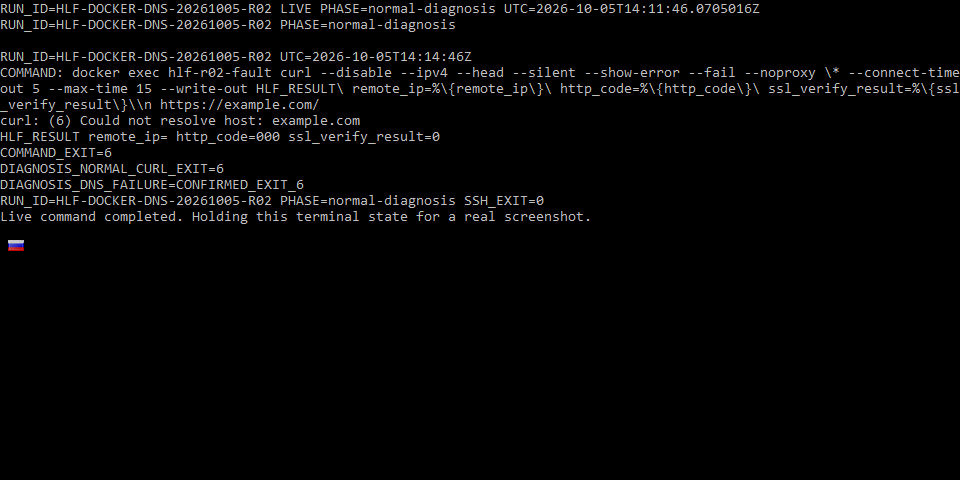
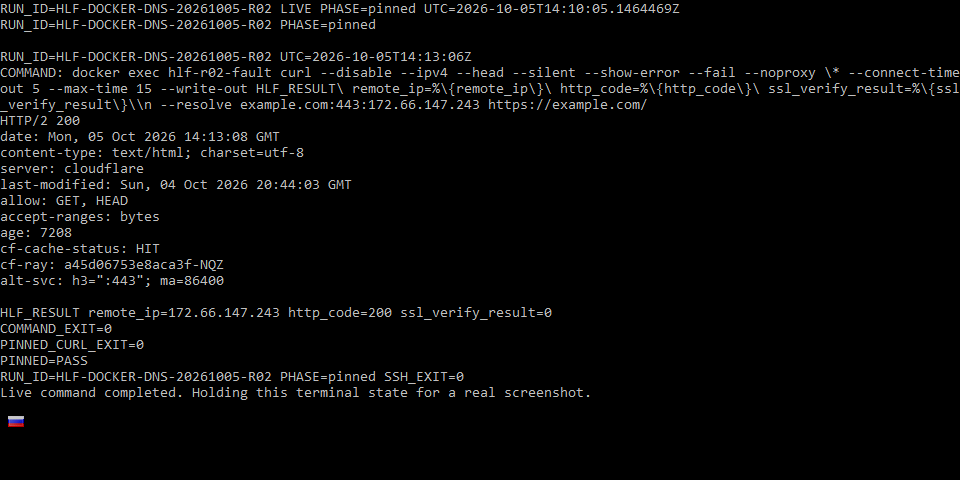
Run HLF-DOCKER-DNS-20261005-R02 tested one specific diagnostic distinction from this page. The evidence below shows the topology, measured before/during/after states, and the strongest terminal captures rather than treating screenshots alone as proof.
- Status
- Virtual Lab Tested
- Tested
- Environment
- Debian 12.15 VM on QEMU 11.1.0 with rootful Docker Engine 29.8.2, default bridge networking, curl 8.22.0, and a controlled CoreDNS 1.14.7 NXDOMAIN responder.
Test topology
Normal hostname path with DNS fault
Address-pinned control
Measured results
| Check | Baseline | Fault active | Recovery |
|---|---|---|---|
| Normal hostname HTTPS | HTTP 200 | curl 6 — could not resolve host | HTTP 200 |
| Same hostname with --resolve | Not required | HTTP 200; TLS verified | No longer needed |
| DNS state | Normal resolver path | Controlled NXDOMAIN response | Custom DNS fault removed |
What this experiment shows
- The failure was isolated to name resolution: the same container still reached the HTTPS endpoint when the hostname was pinned to the baseline IPv4.
- TLS verification remained enabled during the pinned request, so the control did not bypass certificate validation.
- Removing only the controlled DNS fault restored the ordinary hostname request.
Key evidence captures
What this does not prove
This reproduces the address-pinned HTTPS versus hostname-resolution discriminator only. It does not validate every Docker DNS failure mode, Docker Desktop, WSL, rootless Docker, macvlan, ipvlan, overlay, Swarm, every resolver implementation, or physical network appliances.
The complete reviewed bundle includes the full command logs, recovery evidence, additional captures, environment details, and integrity hashes. This article shows only the evidence that helps explain the diagnostic result.
Editorial verification
The citations beside technical claims show their evidence. HomeLabFix chooses the diagnostic order and states where the evidence stops supporting a conclusion.
- Author and technical editor
- Andrey Tretyak
- Verification basis
- The cited vendor or project documentation plus the page-specific reasoning above.
- Hands-on status
- A scoped virtual-lab reproduction is documented above. Other claims remain documentation- and reasoning-based unless separately tested.
- Lab verification
- Virtual Lab Tested · run HLF-DOCKER-DNS-20261005-R02 · · See topology, measurements, evidence captures, and scope.
- Correction path
- Report a source change, scope error, or reproducible contradiction.
Sources
Links were reviewed on 2026-10-05. Reachability and automated validation do not replace editorial verification of each claim.
- Networking overview
Docker · Tier A · accessed 2026-09-11 - Bridge network driver
Docker · Tier A · accessed 2026-09-11 - Port publishing and mapping
Docker · Tier A · accessed 2026-09-05 - docker network inspect
Docker · Tier A · accessed 2026-09-11 - docker inspect
Docker · Tier A · accessed 2026-09-11 - dockerd
Docker · Tier A · accessed 2026-09-11 - Host network driver
Docker · Tier A · accessed 2026-09-05 - docker container exec — run a command in a running container
Docker · Tier A · accessed 2026-09-27 - curl manual — resolve, HEAD, time limits, proxy environment and exit codes
curl project · Tier A · accessed 2026-09-27