Docker Engine / Troubleshooting
Docker Published Port Works Locally but Is Unreachable from the LAN
Compare the working local endpoint with the failing LAN endpoint before investigating publication, application listening context or filtering.
By Andrey Tretyak · Sources last reviewed
A working local request is a starting observation, not proof that the intended LAN-facing port is published. Record where that request went: host loopback, host LAN address, container address or a proxy.[1]
This is an evidence-first comparison, not a firewall repair recipe. Unknown observations lead to a handoff rather than a guessed cause.[2]
Sections
Applicability
- Products
- Docker Engine
- Scope
- For rootful Docker Engine on Linux, bridge networking, IPv4 NAT-style publication and one TCP service. A host-local request succeeds while a LAN request fails. The main path is scoped to Engine 28.0.0 or newer; older versions need version-specific review. Excludes Desktop/WSL/macOS, rootless, host/macvlan/ipvlan, Swarm, IPv6-only, direct routing, other gateway modes and VPN access.[1][2]
- Last verified
Symptoms
- A non-destructive application request still works locally, but the same intended service cannot be reached from another authorized LAN device.[1]
Quick diagnosis
Gather current evidence before choosing a branch. Unknown observations do not establish a failed component.
Record both endpoints
Write down the successful request's execution context, address, TCP port and any proxy, then the failing client's destination. Keep addresses and full outputs private. Do not compare a container port with a different host port as though they were the same endpoint.[1]
Inspect actual publication
With existing authorized Docker CLI access, replace <container> with the intended container name or ID. The first command lists mappings; the second selects the application's container-side TCP port. Replace <container-port> with that port, not the host port. Record every returned host address and port. No matching mapping means this TCP publication is absent, not that a LAN firewall dropped the request.[6]
docker container port <container>docker container port <container> <container-port>/tcpRepeat only a normal read operation
Use the application's existing non-destructive request. Record whether it responds now; do not create records, run jobs or change configuration as a connectivity test.[1]
Interactive troubleshooter
Your answers stay in this browser tab. The tool does not connect to your systems or send diagnostic results.
Guided check / step 1
Is this the supported Linux bridge case?
Confirm the stated scope and Engine version. Do not apply this tree to another networking model.[3][1]
Read the complete diagnostic tree without using the controls
- Is this the supported Linux bridge case?
Confirm the stated scope and Engine version. Do not apply this tree to another networking model.[3][1]
- Yes, supported bridge IPv4 case → Does the claimed local request still work?
- No, or topology is uncertain → Use the installed network model's documentation
- Does the claimed local request still work?
Repeat only a non-destructive application request and record its context.[1]
- Yes, local success is reproducible → Is the intended TCP port actually published?
- No, it no longer responds → Re-establish application health first
- I cannot reproduce it safely → Collect evidence without widening access
- Is the intended TCP port actually published?
Compare the actual mapping with the intended service and protocol.[6]
- Yes, TCP mapping matches → Does the published address cover the intended endpoint?
- Missing mapping or wrong port/protocol → Review the missing or mismatched publication
- Mapping is unknown → Collect evidence without widening access
- Does the published address cover the intended endpoint?
Compare the actual bind address with the client's host-LAN destination; do not substitute a container address.[1]
- Yes, address matches the intended endpoint → Does the intended host-LAN endpoint work from the host?
- No, the published address differs → Review the publication address
- Address scope is unclear → Collect evidence without widening access
- Does the intended host-LAN endpoint work from the host?
Use the same safe request. Success only inside the container or through a proxy is not this result.[1][3]
- Yes, the intended host endpoint works → Which Docker firewall backend is established?
- No, only a different local context works → Investigate the local listening context
- I cannot distinguish the contexts → Collect evidence without widening access
- Which Docker firewall backend is established?
Inspect existing daemon and policy evidence with the owner; do not change the backend.[5][4]
- Documented iptables backend → Is there matching evidence of filtering this request?
- nftables or another/unknown backend → Request backend-specific policy review
- Is there matching evidence of filtering this request?
Use the installed backend's rule ordering and address translation. No log entry is not proof of acceptance.[4]
- Yes, a matching denial is established → Give matching filter evidence to the policy owner
- No matching denial is established → What does another authorized LAN client show?
- Policy evidence is unavailable → Collect evidence without widening access
- What does another authorized LAN client show?
Compare the same endpoint and safe request. A difference narrows the next owner without proving one cause.[2]
- Another LAN client succeeds → Investigate the failing client's LAN path
- The failure remains or evidence is inconclusive → Collect evidence without widening access
- Use the installed network model's documentation
Record the actual environment first. Do not switch to host mode or alter a firewall to force this page's assumptions.[3]
- Re-establish application health first
The required local success is absent. Investigate the application/container with its owner before diagnosing LAN-only access.[3]
- Review the missing or mismatched publication
Send the mapping and intended TCP endpoint to the deployment owner; use the mapping handoff below.[6]
- Review the publication address
The intended and actual address scopes differ. Request a bounded exposure review, not an all-interface bind.[1]
- Investigate the local listening context
Identify which process/context responded. Consult application-specific documentation; this result alone does not prove a listener defect.[3]
- Request backend-specific policy review
Provide the Engine version and backend evidence. The nftables implementation is experimental and is not an iptables rule recipe.[5]
- Give matching filter evidence to the policy owner
Preserve the rule/context and test timestamp. Use the disruptive-change boundary below before any separately approved correction.[4][2]
- Investigate the failing client's LAN path
Provide the working and failing client comparisons to the LAN owner. Client isolation or routing is a hypothesis to inspect, not a diagnosed cause.[2]
- Collect evidence without widening access
Keep exact endpoints, mapping, backend and current results. Ask the relevant owner for a targeted investigation; do not relax security to obtain a result.[6][2]
Detailed diagnosis
1. Establish the network model
Confirm version, rootful Engine and bridge NAT configuration from existing deployment records. Host mode ignores published-port options and is outside this page. Do not switch modes to make the test pass.[3][1]
2. Separate publication from application access
Read the address and port returned by the mapping check. A 127.0.0.1 binding is loopback publication; 0.0.0.0 represents all IPv4 host addresses, not an address to enter on the LAN client. For a specific host address, compare it with the client's actual destination. Publication alone does not prove the application responds or that filtering permits the request. Docker warns that pre-28.0.0 same-L2 peers can reach localhost-published ports; the main path here requires Engine 28.0.0 or newer.[1][6]
3. Test the intended LAN endpoint from the host
Repeat the application's normal read operation from the Docker host and the authorized LAN client, using the same host LAN address, published host port, protocol and application path. Record one result per location: response, refusal, timeout or exact application error. If the host fails too, the original loopback/container-local success did not establish this endpoint. If the host succeeds and the LAN client fails, continue to backend and filtering evidence; the comparison does not identify a particular rule.[1][3]
4. Inspect the actual backend
Read the running daemon's existing configuration and the applicable rules with the host owner. Docker's nftables support is documented as experimental since Engine 29.0.0 and has no equivalent DOCKER-USER chain. Unknown/nftables details require backend-specific review, not an iptables fix.[5]
5. Require matching filtering evidence
For the iptables backend, user filtering in DOCKER-USER is evaluated before Docker's forwarding chains, after destination translation. Ask for evidence matching this request, including translated addresses where relevant. Do not infer a denial from an unrelated rule or from absent logs.[4]
6. Compare another authorized LAN client
Repeat the same non-destructive request from another client on the intended LAN. HomeLabFix uses the contrast to prioritize a client/LAN owner, not to prove a unique router or firewall cause. Docker's published traffic does not follow ordinary ufw INPUT/OUTPUT expectations.[2]
Supported scenarios
These observations narrow the next investigation; they do not establish a unique cause.
The mapping and intended endpoint differ
A missing TCP mapping or a different published address leaves the local and LAN tests incomparable.[1][6]
How to check: Compare the actual mapping with both recorded requests.[6]
The local success covers a different context
A proxy or container-local success may leave the intended direct service path untested. This is an isolation inference, not a confirmed listener fault.[3][1]
How to check: Identify the responding process/context before consulting its application-specific listener documentation.[3]
A host or LAN boundary still needs evidence
Docker-managed bridge rules and the surrounding host policy both matter. A failed request alone does not locate a denial.[2]
How to check: Compare backend-specific evidence and another authorized client's result.[4][5]
Next actions and procedure boundaries
Mapping or address mismatch: deployment-owner review
Provide the actual and intended mapping to the deployment owner. Request only a separately authorized correction that preserves intended exposure; do not blindly recreate the container or broaden the bind address.[6][1]
Local context mismatch: application-owner review
Provide the exact successful and failed contexts and ask the application owner to verify its listener against that application's documentation. There is no universal listener setting in this page.[3]
Matching filter or LAN evidence: network-owner review
Give the policy owner the installed backend, relevant matching evidence and controlled client comparison. Do not flush rules, disable firewall management or substitute host networking.[2][4][5]
Before any separately authorized exposure change
Before changing anything
- Risk
- A mapping, network-mode or firewall change can affect service availability and exposure.[2]
- Safer check
- Confirm the mapping and a matching observation before considering a change.[6]
- Expected result
- A scoped plan should state which intended clients should gain access and which should remain excluded; verify both after any separate change.[2]
- Backup / recovery access
- HomeLabFix requires saved deployment settings, confirmed persistent-data recovery and independent host management access before disruptive work.[2]
- Rollback
- There is no universal rollback recipe here. The owner must verify restoration of the prior deployment and policy for this installation; if recovery is not established, stop.[2]
Planning boundary only: configuration and firewall changes can interrupt service or expose it beyond the intended clients. The responsible deployment/network owner must approve the exact change; this page supplies no mutation command.[2]
Unresolved: assemble a targeted evidence packet
Keep the version, topology, endpoint comparison, mapping and time-correlated observations. Share only sanitized excerpts with the appropriate application or network owner; missing evidence is a reason to investigate, not permission to weaken security.[6][2]
Warnings and boundaries
Virtual lab test
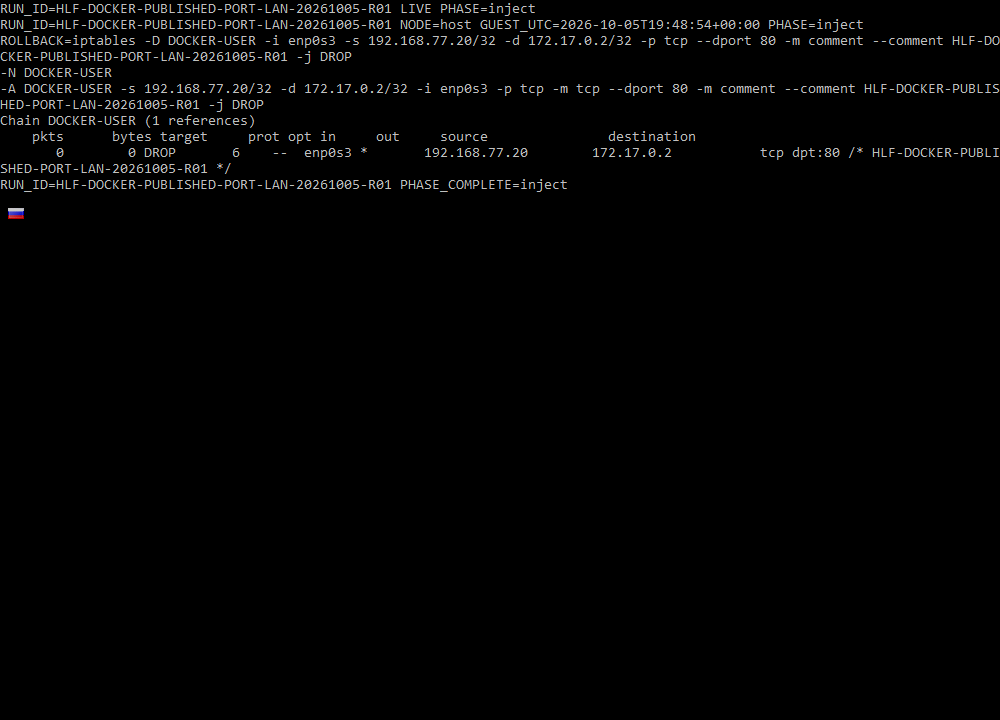
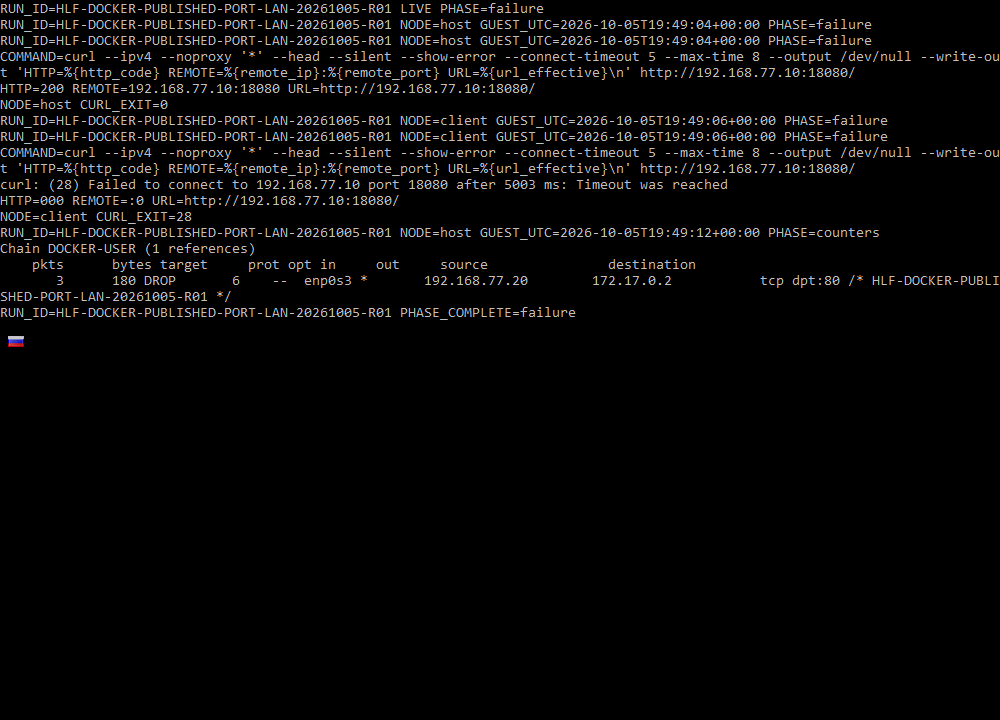
Run HLF-DOCKER-PUBLISHED-PORT-LAN-20261005-R01 tested one specific diagnostic distinction from this page. The evidence below shows the topology, measured before/during/after states, and the strongest terminal captures rather than treating screenshots alone as proof.
- Status
- Virtual Lab Tested
- Tested
- Environment
- Two disposable Debian 12.15 VMs on QEMU 11.1.0 formed an isolated socket-backed virtual LAN. The Docker host ran rootful Docker Engine 29.8.2 with the iptables backend through iptables-nft; nginx 1.30.5 was published only on the host's lab address at 192.168.77.10:18080.
Test topology
Virtual LAN client path
Docker-host control
Measured results
| Probe | Baseline | Fault active | Recovery |
|---|---|---|---|
| Docker host → published endpoint | HTTP 200 | HTTP 200 | HTTP 200 |
| Virtual LAN client → same endpoint | HTTP 200 | curl 28 / HTTP 000 | HTTP 200 |
| Controlled DOCKER-USER counter | — | 0 → 3 packets / 180 bytes | Rule removed |
| Container / mapping state | Running; 80/tcp → 192.168.77.10:18080 | Unchanged | Unchanged |
What this experiment shows
- The host-local and LAN-client requests used the same published URL and application path, so the observed split was not caused by testing different endpoints.
- Read-only packet/NAT evidence established the translated destination as 172.17.0.2:80 before the filter rule was written.
- The client-specific DROP counter increased during the failed LAN request while the Docker-host request continued returning HTTP 200.
- Container ID, container IPv4, publication mapping and both virtual-LAN addresses stayed unchanged through the fault.
- Removing only the controlled rule restored the client request; a later real post-recovery check independently confirmed both nodes still passed.
Key evidence captures
What this does not prove
This validates one host-versus-LAN published-port discriminator under an artificial client-specific filter fault in an isolated virtual LAN. It does not establish the cause of unrelated physical-LAN failures and does not validate physical Ethernet/Wi-Fi, routers, VLANs, client isolation, VPNs, Docker Desktop, WSL, rootless Docker, non-bridge modes, IPv6-only paths, direct routing, every gateway/firewall backend, or every application listener.
The complete reviewed bundle includes the full command logs, recovery evidence, additional captures, environment details, and integrity hashes. This article shows only the evidence that helps explain the diagnostic result.
Editorial verification
The citations beside technical claims show their evidence. HomeLabFix chooses the diagnostic order and states where the evidence stops supporting a conclusion.
- Author and technical editor
- Andrey Tretyak
- Verification basis
- The cited vendor or project documentation plus the page-specific reasoning above.
- Hands-on status
- A scoped virtual-lab reproduction is documented above. Other claims remain documentation- and reasoning-based unless separately tested.
- Lab verification
- Virtual Lab Tested · run HLF-DOCKER-PUBLISHED-PORT-LAN-20261005-R01 · · See topology, measurements, evidence captures, and scope.
- Correction path
- Report a source change, scope error, or reproducible contradiction.
Sources
Links were reviewed on 2026-10-05. Reachability and automated validation do not replace editorial verification of each claim.
- Port publishing and mapping
Docker · Tier A · accessed 2026-09-05 - Packet filtering and firewalls
Docker · Tier A · accessed 2026-09-05 - Host network driver
Docker · Tier A · accessed 2026-09-05 - Docker with iptables
Docker · Tier A · accessed 2026-09-05 - Docker with nftables
Docker · Tier A · accessed 2026-09-05 - docker container port
Docker · Tier A · accessed 2026-09-05