Pi-hole / Troubleshooting
Pi-hole Installed but Clients Get No DNS Response
Separate clients bypassing Pi-hole from Pi-hole answering nothing by checking FTL state, a direct query, the upstream path, port 53 ownership, and the effective client resolver before any upstream or DHCP change.
By Andrey Tretyak · Sources last reviewed
Start by separating three observations: whether Pi-hole is running, whether Pi-hole itself can reach an upstream resolver, and whether clients are actually sending DNS queries to Pi-hole. The official command reference provides the status and query probes, debugger, and the reloadlists and reloaddns subcommands used on this page. pihole reloaddns flushes and reloads the FTL DNS cache but does not re-read configuration files, so it cannot apply configuration edits.[1]
Two boundaries in this diagnosis come straight from official Pi-hole documentation rather than inference. The Docker Tips and Tricks page states that the systemd-resolved stub listener will prevent Pi-hole from listening on port 53, with a documented drop-in fix. The Post-Install page states that the network must be configured so DHCP clients use Pi-hole as their DNS server, offering the built-in DHCP server or manual per-device setup as alternatives.[2][3]
Sections
Applicability
- Products
- Pi-hole
- Scope
- For Pi-hole v6.x (Core, FTL, and Web with pihole.toml-based configuration, per the FTL Configuration Reference) on a bare-metal host or in Docker, where clients are expected to use Pi-hole as their DNS resolver but receive no answer. Version 5 paths are excluded and must be version-gated out wherever configuration differs. This page does not cover blocklist curation, web-interface-only failures with working DNS, or upstream-provider outages as the primary subject.[1][3][5]
- Last verified
Symptoms
Quick diagnosis
Separate clients bypassing Pi-hole from Pi-hole answering nothing by probing FTL, the direct query, the upstream path, port 53, and the effective client resolver.
Confirm Pi-hole FTL reports a running state
Use the documented pihole status probe to confirm the service state before any deeper check. Run it in the environment where Pi-hole executes: on the bare-metal host directly, or inside the Pi-hole container/runtime using the deployment's documented access method — never as a container command run on the Docker host shell. A stopped FTL explains every downstream symptom and must be handled before upstream, port, or client reasoning begins.[1]
pihole statusSend one direct query to Pi-hole and one past it
Compare the client-side Pi-hole query with a runtime-side upstream query. If the client-side Pi-hole query answers, investigate what resolver the failing clients actually use. If the client query is silent but the runtime-side upstream query answers, the fault is at the Pi-hole host layer. If the runtime-side upstream query is also silent, continue with upstream or basic outbound-connectivity diagnosis.[1][4]
dig @<pihole-ip> <test-name>dig @<upstream-ip> <test-name>Do not change upstreams, resolvers, or DHCP before classification
Do not edit the upstream list, disable stub resolvers, or change DHCP-advertised DNS before the probes separate an FTL outage, a port conflict, an upstream failure, and a client bypass. A change made before classification can move every client at once without fixing the actual boundary.[1]
Interactive troubleshooter
Your answers stay in this browser tab. The tool does not connect to your systems or send diagnostic results.
Guided check / step 1
Are clients failing to get DNS answers they expect through Pi-hole?
Confirm the subject is missing DNS answers for clients that should use Pi-hole. A blocklist dispute, a web-interface problem with working DNS, or an upstream outage affecting everything equally is a different observation.[1]
Read the complete diagnostic tree without using the controls
- Are clients failing to get DNS answers they expect through Pi-hole?
Confirm the subject is missing DNS answers for clients that should use Pi-hole. A blocklist dispute, a web-interface problem with working DNS, or an upstream outage affecting everything equally is a different observation.[1]
- Yes, clients get no DNS answer → Does Pi-hole FTL report a running DNS state?
- No, a different observation → Investigate the actual DNS observation
- Does Pi-hole FTL report a running DNS state?
Use the documented status surface. A stopped service explains everything downstream and is handled first; only a running service continues to query-level reasoning.[1]
- Yes, FTL is running → Does a client-side query addressed to Pi-hole answer?
- No, the service is stopped → Return the stopped DNS service through documented control
- Cannot confirm the service state → Collect a Pi-hole DNS evidence packet
- Does a client-side query addressed to Pi-hole answer?
From a client, send one query straight at the Pi-hole address. An answer means the client can reach Pi-hole and the fault is in what the clients actually use; silence continues toward the Pi-hole-runtime upstream branch.[1]
- Yes, the client reaches Pi-hole and it answers → Do the failing clients actually use Pi-hole as their resolver?
- No answer from Pi-hole → Does a query from the Pi-hole runtime to an upstream answer?
- Probe result is unclear → Collect a Pi-hole DNS evidence packet
- Does a query from the Pi-hole runtime to an upstream answer?
From the Pi-hole runtime itself (the bare-metal host, or inside the Pi-hole container/runtime using the deployment's documented access method), query a configured upstream directly. An answer there isolates the fault to the Pi-hole host level; silence there points at the upstream path or basic outbound connectivity instead. A client-side upstream query does not prove this, because it runs in a different network context.[4]
- Yes, the runtime reaches the upstream → Does the documented stub resolver hold port 53 on this host?
- No, the upstream is silent from the runtime → Correct the unreachable upstream path
- Probe result is unclear → Collect a Pi-hole DNS evidence packet
- Does the documented stub resolver hold port 53 on this host?
Check which process owns port 53. This branch applies specifically to hosts running the systemd-resolved stub listener documented as preventing Pi-hole from binding port 53; other port owners need their own investigation.[2]
- Yes, the documented stub holds it → Free port 53 using the documented stub procedure
- No, port 53 ownership is fine → Collect a Pi-hole DNS evidence packet
- Cannot confirm port ownership → Collect a Pi-hole DNS evidence packet
- Do the failing clients actually use Pi-hole as their resolver?
Read the effective resolver on a failing client and the DHCP-advertised DNS. The official setup expects DHCP clients to use Pi-hole; clients with another resolver bypass it no matter how healthy it is.[3]
- No, they use another resolver → Direct the bypassing clients at Pi-hole
- Yes, they use Pi-hole and still fail → Collect a Pi-hole DNS evidence packet
- Cannot confirm the effective resolver → Collect a Pi-hole DNS evidence packet
- Return the stopped DNS service through documented control
Start the DNS service through the deployment's documented service control and re-run the status probe plus one direct query. Upstreams, ports, and clients do not change on this branch.[1]
- Correct the unreachable upstream path
Replace the failing upstreams with working documented options through the deployment's configuration surface, then verify with a direct upstream query followed by a direct Pi-hole query. Record the prior list for rollback.[4]
- Free port 53 using the documented stub procedure
Disable the stub listener with the documented drop-in, repoint the host resolver symlink, and restart the stub service exactly as documented. This branch never applies to hosts without that resolver.[2]
- Direct the bypassing clients at Pi-hole
Configure the router so DHCP clients use Pi-hole, enable the built-in DHCP server only after disabling DHCP on the router, or set individual devices manually as a last resort — after read-only proof of the bypass.[3]
- Investigate the actual DNS observation
A blocklist dispute needs allowlist and query-log investigation. A web-interface failure with working DNS needs web-server investigation. An everything-equally-down outage needs upstream and connectivity investigation.[1]
- Collect a Pi-hole DNS evidence packet
Preserve the release line, the FTL status output, both direct-probe results, the port 53 ownership, the effective client resolver with the DHCP advertisement, and the configured upstreams. Send the sanitized evidence to the operator; no documented branch remains.[1]
Detailed diagnosis
1. Establish whether FTL DNS is running
Confirm through the documented status surface whether pihole-FTL is running and serving DNS. A stopped service is the first branch and exits the deeper tree; only a running service continues to query-level reasoning.[1]
2. Compare the client-to-Pi-hole probe against the Pi-hole-runtime upstream probe
Run the two probes in their separate environments. The client-to-Pi-hole query proves the client can reach Pi-hole. The Pi-hole-runtime upstream query (run on the bare-metal host, or inside the Pi-hole container/runtime using the deployment's documented access method) proves Pi-hole can reach its upstream. Client queries answering while clients still fail points at client configuration; the client probe silent while the runtime upstream probe answers points at the Pi-hole host level; the runtime upstream probe also silent points upstream or at basic outbound connectivity.[1][4]
3. Check who owns port 53 on the Pi-hole host
When Pi-hole is silent but the upstream answers, check which process holds TCP and UDP port 53 on the host. The documented systemd-resolved case applies specifically to hosts running that stub resolver (notably Ubuntu and Fedora derivatives, including Docker hosts): its stub listener prevents Pi-hole from binding port 53. Do not generalize this branch to hosts without that resolver.[2]
4. Verify the resolver the failing client actually uses
When Pi-hole answers direct queries but clients still fail, read the effective resolver on a failing client and the DHCP-advertised DNS before changing anything. The official Post-Install page expects DHCP clients to use Pi-hole, with the built-in DHCP server or manual per-device setup as documented alternatives; prefer this read-only verification over editing DHCP first.[3]
Supported scenarios
These observations narrow the next investigation; they do not establish a unique cause.
pihole-FTL is not running or not serving DNS
With the DNS service stopped, every client query fails regardless of upstreams, ports, or client configuration. The documented status surface reports this state directly.[1]
How to check: Confirm the stopped state through the status probe before touching upstreams, ports, or clients.[1]
Another resolver holds port 53 on the Pi-hole host
The official Docker Tips and Tricks documentation states that the systemd-resolved stub listener prevents Pi-hole from listening on port 53, so queries never reach FTL even though the service may otherwise be healthy. This branch applies to the documented stub-resolver case, not to arbitrary port conflicts.[2]
How to check: Confirm which process holds port 53 and confirm the host runs the documented stub resolver before applying its documented fix.[2]
Pi-hole cannot complete recursion through its upstreams
Pi-hole forwards client queries to its configured upstream servers, chosen at setup from the documented provider options. When direct upstream queries also fail, or the configured upstreams are unreachable or wrong, Pi-hole has no complete answer to return.[4]
How to check: Confirm direct upstream queries fail or the configured upstream list is unreachable or incorrect, while Pi-hole itself is running and bound.[4][1]
Failing clients are not actually using Pi-hole
The official Post-Install documentation expects the network to direct DHCP clients to Pi-hole; clients with another advertised resolver, hardcoded device DNS, or encrypted-DNS bypass never send their queries to Pi-hole, so no Pi-hole-side fix can change their behavior.[3]
How to check: Read the effective resolver on a failing client and the DHCP-advertised DNS to confirm Pi-hole is absent before changing any network configuration.[3]
Next actions and procedure boundaries
Stopped FTL: return the DNS service through the deployment's documented control
If the status probe shows the service stopped, start it through the deployment's documented service control (system service on bare metal, container restart policy on Docker) and re-run the status probe plus one direct query. This corrects only a stopped service; it does not change upstreams, ports, or clients.[1]
Stale cache behavior: flush and reload the FTL DNS cache
If the failure follows list or cache changes rather than a stopped service, use the documented pihole reloaddns subcommand to flush and reload the FTL DNS cache. Run it where Pi-hole executes: on the bare-metal host or inside the Pi-hole container/runtime using the deployment's documented access method.[1]
pihole reloaddnsBroken upstream path: correct the configured upstreams
Before changing anything
- Risk
- Changing upstreams alters name resolution for every client using Pi-hole. A wrong or unreachable replacement extends the outage to the whole network instead of fixing it.[4]
- Safer check
- Prove with direct queries that the current upstreams fail while Pi-hole is running and bound. Record the current upstream list before editing.[4][1]
- Expected result
- After the correction, direct upstream queries and direct Pi-hole queries both answer, and client queries resume without per-device workarounds.[4]
- Backup / recovery access
- Record the full prior upstream configuration so it can be restored exactly.[4]
- Rollback
- Restore the recorded prior upstream list if resolution does not recover, then re-run the paired direct probes before further changes.[4]
Replace an unreachable or incorrect upstream resolver with a working option supported by the Pi-hole documentation. Apply the edit through the deployment's documented configuration surface; the FTL reference documents the v6 configuration-file format. Then repeat a runtime-side upstream query and a client query to Pi-hole.[4][5][1]
Stub-resolver conflict: free port 53 per the documented stub procedure
Before changing anything
- Risk
- Reconfiguring the host resolver changes name resolution for the host itself. A wrong edit can leave the Pi-hole host without working DNS, which also blocks repair downloads and debug-log uploads.[2]
- Safer check
- Confirm the stub listener actually holds port 53 and confirm the host runs the documented resolver. Record the current resolver configuration before editing.[2]
- Expected result
- After the change, port 53 is free for Pi-hole to bind, the host still resolves names, and direct Pi-hole queries answer.[2]
- Backup / recovery access
- Record the prior stub configuration and resolver symlink target so both can be restored exactly.[2]
- Rollback
- Remove the drop-in, restore the prior resolver symlink, and restart the stub service to return the host to its recorded prior resolver state.[2]
Only on hosts running the documented systemd-resolved stub listener that prevents Pi-hole from binding port 53: disable the stub listener with the documented drop-in, repoint the host resolver symlink as documented, and restart the stub service. This branch never applies to hosts without that resolver.[2]
sudo sh -c 'mkdir -p /etc/systemd/resolved.conf.d && printf "[Resolve]\nDNSStubListener=no\n" | tee /etc/systemd/resolved.conf.d/no-stub.conf'sudo sh -c 'rm -f /etc/resolv.conf && ln -s /run/systemd/resolve/resolv.conf /etc/resolv.conf'systemctl restart systemd-resolvedClient bypass: direct clients at Pi-hole through documented setup
Before changing anything
- Risk
- Changing DHCP-advertised DNS or enabling a second DHCP server affects every device on the network. Two active DHCP servers in particular can break addressing for all clients.[3]
- Safer check
- Prove with effective-resolver reads that the failing clients bypass Pi-hole. Record the current DHCP DNS advertisement and confirm exactly one DHCP server will remain active.[3]
- Expected result
- After the change, failing clients show Pi-hole as their effective resolver and their queries appear answered in Pi-hole.[3]
- Backup / recovery access
- Record the prior DHCP DNS advertisement and DHCP server assignment so the previous network configuration can be restored.[3]
- Rollback
- Restore the recorded prior DHCP DNS advertisement and server assignment if clients do not recover, then re-read the effective resolver before further changes.[3]
After read-only evidence shows that failing clients use another resolver, direct them to Pi-hole using one of the documented Post-Install options. Configure the router so DHCP clients use Pi-hole; or, after disabling DHCP on the router, enable Pi-hole's built-in DHCP server. Manual per-device DNS configuration is the last-resort option.[3]
If no branch matches: preserve the evidence
Record the installed Pi-hole release line, the FTL status output, the paired direct-probe results, the port 53 ownership, the effective client resolver and DHCP advertisement, and the configured upstreams. Send the sanitized evidence to the operator; the official references describe no procedure for a failure outside these branches.[1]
Warnings and boundaries
Virtual lab test
Run HLF-PIHOLE-FTL-STOP-20261010-R01 tested one specific diagnostic distinction from this page. The evidence below shows the topology, measured before/during/after states, and the strongest terminal captures rather than treating screenshots alone as proof.
- Status
- Virtual Lab Tested
- Tested
- Environment
- Two independent isolated Debian 12.15 QEMU 11.1.0 guests (kernel 6.1.0-53-cloud-amd64) on a private virtual Ethernet link, with bare-metal Pi-hole Core v6.4.3 / FTL v6.7.1 / Web v6.6 at 192.168.88.10 and an independent dnsmasq v2.90 synthetic upstream and DNS client at 192.168.88.20. Each guest's OS resolver remained independent of Pi-hole; the experiment used explicit UDP and TCP dig requests for probe.hlf.test A, whose synthetic response was 198.51.100.42.
Test topology
Client DNS request through Pi-hole
Upstream control continues to answer
Measured results
| Probe | Healthy baseline | FTL stopped | FTL restored |
|---|---|---|---|
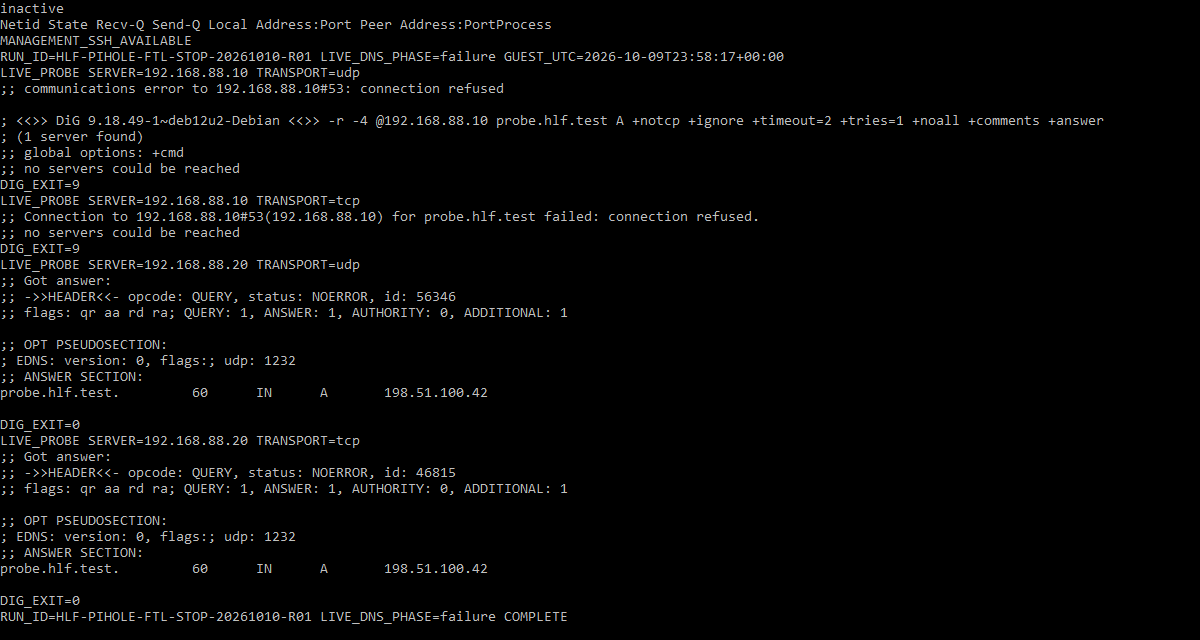
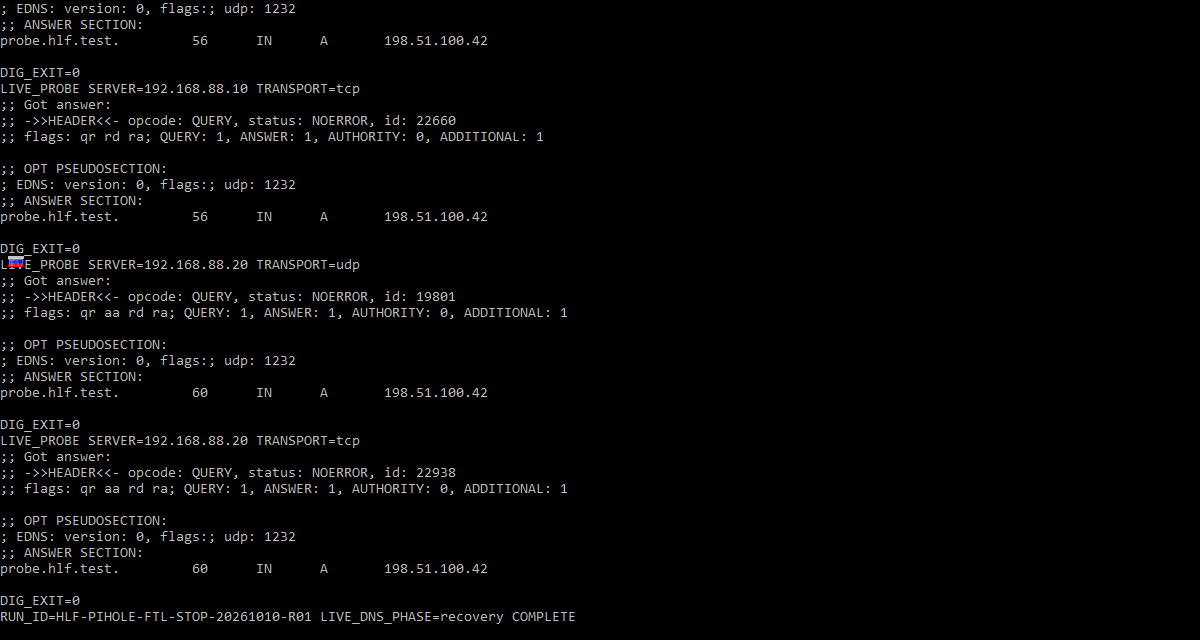
| Client → Pi-hole DNS, UDP and TCP | NOERROR / A 198.51.100.42; dig 0 | Connection refused; dig 9; no DNS RCODE | NOERROR / same A; dig 0 |
| Client → upstream, UDP and TCP | NOERROR / same A | NOERROR / same A | NOERROR / same A |
| Pi-hole VM → upstream, UDP and TCP | NOERROR / same A | NOERROR / same A | NOERROR / same A |
| FTL service / Pi-hole port 53 | Active; UDP and TCP listening | Inactive / MainPID 0; no FTL listener | Active; original UDP and TCP bindings |
What this experiment shows
- The independent client reached Pi-hole and obtained the expected A answer over UDP and TCP before the controlled service stop, after a lab-zone configuration correction made before the accepted baseline.
- Only the FTL service was stopped via systemctl. Its port-53 listener disappeared and the client reported connection refused for both transport protocols, while the guest remained reachable for administration.
- The synthetic upstream DNS server continued to answer the same direct query from both guests throughout the fault; these paired controls distinguished stopped FTL from an upstream outage in this test.
- Starting FTL without changing the Pi-hole TOML restored the client answers. The Pi-hole configuration SHA-256, normalized interfaces/routes/resolvers and upstream process identity remained consistent with the baseline.
- The pihole status output during the stop reported that DNS was not running, although its command exit status was zero. Read the reported state and pair it with listener and query probes instead of interpreting exit zero as proof of DNS health.
Key evidence captures
What this does not prove
Only a deliberately stopped Pi-hole FTL service on bare-metal Pi-hole v6.x in isolated Debian virtual machines was reproduced. The result does not verify the other diagnoses described on this page, including port-53 conflicts, unreachable upstream resolvers, clients bypassing Pi-hole, DHCP, DNS filtering rules, Docker deployments, physical routers or live home networks. The generated fixture zone required a documented correction before the healthy baseline; an earlier preparation service restart timed out, but the actual fault injection stopped FTL gracefully. Guest timestamps were approximately three minutes ahead of host UTC; the recovery watchdog was armed but did not fire.
The complete reviewed bundle includes the full command logs, recovery evidence, additional captures, environment details, and integrity hashes. This article shows only the evidence that helps explain the diagnostic result.
Editorial verification
The citations beside technical claims show their evidence. HomeLabFix chooses the diagnostic order and states where the evidence stops supporting a conclusion.
- Author and technical editor
- Andrey Tretyak
- Verification basis
- The cited vendor or project documentation plus the page-specific reasoning above.
- Hands-on status
- A scoped virtual-lab reproduction is documented above. Other claims remain documentation- and reasoning-based unless separately tested.
- Lab verification
- Virtual Lab Tested · run HLF-PIHOLE-FTL-STOP-20261010-R01 · · See topology, measurements, evidence captures, and scope.
- Correction path
- Report a source change, scope error, or reproducible contradiction.
Sources
Links were reviewed on 2026-10-10. Reachability and automated validation do not replace editorial verification of each claim.
- The pihole Command
Pi-hole · Tier A · accessed 2026-09-07 - Tips and Tricks (Docker)
Pi-hole · Tier A · accessed 2026-09-07 - Post-Install
Pi-hole · Tier A · accessed 2026-09-07 - Upstream DNS Providers
Pi-hole · Tier A · accessed 2026-09-07 - Pi-hole FTL Configuration Reference
Pi-hole · Tier A · accessed 2026-09-07