Nginx Proxy Manager / Troubleshooting
Nginx Proxy Manager 502 Bad Gateway: Diagnose the Upstream
NPM opens and the proxy host exists, but requests through it return 502 Bad Gateway. Compare upstream reachability from the NPM network context and match the forward address and the proxy error log against a stopped upstream, a wrong port, a localhost or name-resolution mismatch, or a TLS scheme failure.
By Andrey Tretyak · Sources last reviewed
An HTTP 502 from an NPM proxy host means nginx accepted the request but could not complete the exchange with the configured upstream. The proxy host tells NPM which hostname or IP, port, and http or https scheme to use. Diagnose those upstream details before changing TLS or Docker networking.[1][3]
Test from the same network context as NPM whenever possible. A browser on another machine proves only that the upstream is reachable from that machine. Compare the client, Docker host, NPM container or an equivalent network namespace, and the upstream listener. The first point where reachability changes narrows the fault to the upstream service or to the NPM-to-upstream path.[2][4][3]
Sections
Applicability
- Products
- Nginx Proxy Manager
- Scope
- For a Nginx Proxy Manager 2.15.1 Docker bridge deployment where a proxy host record exists, the NPM admin UI opens, and requests through the proxy host return HTTP 502 Bad Gateway. Whether the upstream answers is not assumed in advance; reachability is evaluated during diagnosis, starting from a network context equivalent to NPM. This page does not cover host-network deployments, certificate issuance or renewal failures, Cloudflare Tunnel errors, NPM installation, DNS-only problems, or generic Docker networking.[1][2][7]
- Last verified
Symptoms
- The NPM admin UI opens and the proxy host record exists, but requests through the proxy hostname return HTTP 502 Bad Gateway; whether the upstream answers on its own is still undetermined at this point. An NPM login failure, a certificate renewal error, or a tunnel-specific error page is a different observation.[1][4]
Quick diagnosis
Compare upstream reachability from an NPM-equivalent network context, then match the forward address and the proxy error log before changing anything.
Record the exact 502 and where it appears
Record whether the 502 appears on the proxied public hostname, in the NPM admin UI itself, or both, with the full response text. A 502 only on proxied traffic keeps this page applicable; a 502 on the admin UI or a renewal error belongs elsewhere. Do not proceed on a remembered paraphrase.[1]
Contact the upstream and note where you tested from
Request the upstream application directly at its own address and port, then repeat the check from a network context equivalent to NPM where possible. A result seen only from a browser or another machine is comparative evidence, because it does not repeat the NPM container path. Use only a normal non-destructive request the application already serves.[4]
Read the proxy host error log
For NPM 2.15.1, the proxy-host template writes /data/logs/proxy-host-<id>_error.log inside the NPM container. Find the storage mounted at /data in your deployment configuration; the guide's ./data:/data example puts these files under ./data/logs on the host. Use your actual mount, not a guessed working directory.[7][1]
Inspect the matching file with your existing read-only file viewer. Match the proxy hostname and request timestamp; do not assume that host ID 1 is yours. Preserve the error wording and upstream endpoint, but redact client addresses, query tokens and private names before sharing. An empty or unrelated log is inconclusive.[7]
Do not change the proxy host, upstream, or TLS settings before classification
Do not edit the forward hostname, port, or scheme, restart the upstream, or change TLS settings before comparing reachability from the NPM network context and confirming the exact log signature. A change made before classification can hide which upstream boundary actually failed.[2]
Interactive troubleshooter
Your answers stay in this browser tab. The tool does not connect to your systems or send diagnostic results.
Guided check / step 1
Does the request through the NPM proxy host return 502 while NPM itself opens?
Confirm the NPM admin UI opens and the proxy host record exists, while requests through the proxy hostname return HTTP 502 Bad Gateway. A failing admin UI, a renewal error, or a tunnel-specific error page is a different observation.[1]
Read the complete diagnostic tree without using the controls
- Does the request through the NPM proxy host return 502 while NPM itself opens?
Confirm the NPM admin UI opens and the proxy host record exists, while requests through the proxy hostname return HTTP 502 Bad Gateway. A failing admin UI, a renewal error, or a tunnel-specific error page is a different observation.[1]
- Yes, proxy 502 with working NPM → What upstream target does the proxy host record?
- No, a different observation → Investigate the actual NPM observation
- What upstream target does the proxy host record?
Read the recorded forward hostname or IP and port before any reachability conclusion: this record selects which comparison applies next. A localhost address is the NPM container itself, a container name needs a shared Docker network, and a LAN IP or fully qualified name still needs a check from the NPM network context.[2]
- localhost or 127.0.0.1 → Replace the localhost forward address
- A container or service name → Make the container name resolvable for the proxy
- A LAN IP or fully qualified name → Can the recorded target be reached from a network context equivalent to NPM?
- Address type is unclear → Collect an NPM 502 evidence packet
- Can the recorded target be reached from a network context equivalent to NPM?
Test inside the NPM container with an existing approved client; record the same scheme, target, port and time used in the comparison. The Docker host and upstream listener are separate vantage points, not substitutes for the NPM network context. If you cannot perform the NPM-side comparison, choose the unconfirmed result.[8][9]
- Fails from every vantage point, including NPM-equivalent context → Recover the upstream application first
- Answers elsewhere but fails from NPM-equivalent context → Which signature appears in the proxy host error log?
- Answers from NPM-equivalent context too → Which signature appears in the proxy host error log?
- Cannot test from NPM-equivalent context → Collect an NPM 502 evidence packet
- Which signature appears in the proxy host error log?
Locate the per-host error file as described in Quick diagnosis, then compare the request timestamp and upstream with detailed step 3. A refusal, unresolved name or TLS alert selects an investigation branch; none alone proves every underlying cause.[7][3]
- connection refused → Does anything listen on the recorded target from the NPM network view?
- host not found in upstream → Give the proxy a resolvable upstream name
- TLS handshake failure → Align the scheme and TLS negotiation with the upstream
- No matching signature → Collect an NPM 502 evidence packet
- Does anything listen on the recorded target from the NPM network view?
Confirm from a vantage point sharing the NPM container's network view whether anything accepts connections on the recorded address and port. Nothing listening means the upstream target is wrong or stopped; a listener on a different port means the recorded forward port is wrong.[4][2]
- Nothing listens there → Restore the stopped upstream listener
- It listens on a different port → Correct the forward port to the serving port
- Cannot confirm the listener → Collect an NPM 502 evidence packet
- Recover the upstream application first
The recorded target fails from every relevant vantage point, including a network context equivalent to NPM, so investigate the upstream application with its owner before any proxy diagnosis. No proxy-host change belongs on this branch.[4]
- Replace the localhost forward address
Point the proxy host at an address reachable from inside the NPM container: the Docker host address where appropriate, or the container service name on a shared Docker network with its internal port. Never assume host-side listening proves the recorded target.[2]
- Make the container name resolvable for the proxy
Join NPM and the upstream to a shared Docker network and use the service name with its internal port, or switch to a DNS-resolvable name or IP. In some configurations an unresolved upstream hostname can additionally cause nginx configuration loading or reload failures; confirm the actual NPM/nginx log before assuming wider impact.[2][5]
- Restore the stopped upstream listener
Start or repair the upstream so it listens on the recorded target, verify it answers directly, then retest through the proxy hostname. The proxy record does not change on this branch.[4]
- Correct the forward port to the serving port
Change the recorded forward port to the port the application actually serves, distinguishing internal container ports from published host ports. Retest through the proxy hostname afterwards.[2]
- Give the proxy a resolvable upstream name
Replace the unresolvable forward name with a service name on a shared Docker network or a DNS-resolvable name or IP. Verify the name resolves from the NPM host before retesting.[5]
- Align the scheme and TLS negotiation with the upstream
Set the recorded scheme to the protocol the upstream serves and resolve the handshake failure the log names. Never disable TLS verification as a fix.[4]
- Investigate the actual NPM observation
A failing admin UI needs NPM service investigation. A renewal error needs the certificate renewal diagnosis. A tunnel-specific error needs tunnel diagnosis. Installation and DNS-only problems each need their own procedure.[1]
- Collect an NPM 502 evidence packet
Preserve the exact proxy response, the NPM version, the proxy forward hostname, port, and scheme, the reachability result from each vantage point tested, and the full proxy error log lines. Where an otherwise answering upstream stays unreachable from the NPM network context alone, keep the Docker network attachment and any routing or firewall boundary between NPM and the upstream inside the investigation scope. Send the sanitized evidence to the operator; no documented branch remains.[1][4]
Detailed diagnosis
1. Compare reachability from the NPM network context
Repeat an authorized, non-destructive request from inside the NPM container using tools already present there. Keep the upstream scheme, address, port and test path identical. If no suitable client exists, record that limitation instead of treating a host-side test as equivalent. Tests on the Docker host or on the upstream are separate comparisons; neither automatically shares the NPM container network namespace.[8][9]
Record one row per execution location: target, time, response or exact error. An answer from the upstream itself combined with a failure inside NPM narrows the next checks to the NPM-to-upstream path. A failed connection does not by itself distinguish a stopped service, wrong endpoint or rejecting network rule.[3][2]
2. Classify what the forward address means from inside the NPM container
Read the recorded forward hostname or IP and forward port from the NPM container's network context. In the scoped bridge deployment, 127.0.0.1 is its own loopback. Automatic Docker service-name resolution requires a shared user-defined network. A literal LAN IP needs no hostname lookup; a hostname must resolve through the container's configured name-resolution path. The official NPM example uses a shared network and the upstream service name with its container port.[2][8]
3. Match the proxy error log signature
Connection refused: record the exact address and port and compare them with the intended listener. Treat refusal as an observation; it does not uniquely identify a stopped application. Confirm the endpoint and listener before selecting that fix.[3]
Name lookup: the reported fragment "host not found in upstream" identifies a name-resolution failure during nginx configuration loading. Issue #633 is a user report, not proof that every unresolved name produces the same startup failure. Check which name and timestamp apply to your installation.[5]
TLS: issue #3961 reports "SSL_do_handshake() failed" with "tlsv1 alert protocol version". That specific alert directs investigation toward protocol negotiation. A generic handshake failure has other possibilities, so keep its full error text instead of immediately toggling HTTP/HTTPS. These are source-reported fragments, not HomeLabFix test logs.[4][3]
4. For a refused connection, separate a stopped listener from a wrong port
Confirm whether anything listens on the recorded target from a vantage point that shares the NPM container's network view. Nothing listening means the upstream is stopped or bound elsewhere; a listener on a different port means the recorded forward port is wrong. Do not infer from host-side listening alone when NPM runs containerized.[4][2]
Supported scenarios
These observations narrow the next investigation; they do not establish a unique cause.
The upstream application is stopped or not listening on the recorded target
The proxy error log shows a refused connection to the recorded address and port, and no listener answers there. Nginx forwards the request to the configured upstream; when nothing accepts it, the client sees 502. The upstream may be stopped, crashed, or bound to a different interface.[4][3]
How to check: Confirm the refused address and port in the log match the proxy host record, then confirm whether anything listens on that target from a vantage point sharing the NPM container's network view. A failure seen only from elsewhere does not establish this cause.[4]
The recorded forward port is not the application's port
The forward port names a port nothing serves, while the application listens on a different one — commonly a container's published host port recorded instead of its internal port, or vice versa. The official advanced configuration shows container ports as internal to their image and reachable by service name only inside a shared network.[4][2]
How to check: Compare the recorded forward port against the port the application actually serves, distinguishing published host ports from internal container ports.[2]
The forward address means something different inside the NPM container
In a bridge deployment, localhost resolves to the NPM container itself; 127.0.0.1 is its loopback address. Automatic service-name resolution uses a shared user-defined network. A Docker forum user reports a 502 after forwarding to localhost from a container. That report illustrates the symptom; Docker and NPM documentation establish the networking behavior.[2][8][6]
How to check: Read the recorded forward address and determine what it resolves to from inside the NPM container's network namespace before changing it.[2]
The forward hostname does not resolve for the proxy
The proxy log shows a host-not-found failure for the recorded upstream name. A container name works only on a shared Docker network, and any other name needs working DNS from the NPM host. In one reported case, nginx failed to start when a recorded container hostname vanished; confirm the actual log before assuming wider impact.[5][2]
How to check: Confirm the exact unresolved name in the log, then confirm whether that name should resolve via the shared Docker network or via DNS.[5]
The recorded scheme or TLS negotiation disagrees with the upstream
The proxy log shows a TLS handshake failure toward the upstream, for example a protocol-version alert when the upstream accepts only a newer TLS version than offered. The recorded http or https scheme must also match what the upstream serves; nginx passes the request to the configured upstream and the handshake must complete.[4][3]
How to check: Confirm the TLS failure signature in the log and compare the recorded scheme against the protocol the upstream actually serves.[4]
Next actions and procedure boundaries
Stopped upstream: restore the application listener on its documented target
Before changing anything
- Risk
- Starting or restarting the upstream application interrupts whatever that application serves. Confirm the correct application and host before acting.[4]
- Safer check
- Confirm the refused address and port in the proxy log match this upstream, and confirm the target fails from a network context equivalent to NPM — including the NPM container's view — before treating the upstream as the cause.[4]
- Expected result
- After the repair, the upstream answers directly on the recorded target and the proxy host returns the application instead of 502.[4]
- Backup / recovery access
- Record the current upstream state, the proxy forward address and port, and the log signature before acting. Preserve the application configuration so the previous state can be restored.[4]
- Rollback
- If the application misbehaves after the change, restore its previous configuration and startup state from the recorded values, then re-collect the proxy log before further changes.[4]
Start or repair the upstream application so it listens on the address and port the proxy host already records, then verify it answers directly before retesting through NPM. This branch changes the upstream, not the proxy record.[4]
Wrong port: correct the forward port to the serving port
Before changing anything
- Risk
- Editing the proxy host changes what the public hostname reaches. An incorrect edit can move the outage to the wrong backend instead of fixing it.[2]
- Safer check
- Prove the serving port from a vantage point that shares the NPM container's network view, and record the current forward hostname, port, and scheme before editing.[2]
- Expected result
- After the correction, the recorded forward port and the proven serving port agree, and the proxy hostname returns the application.[2]
- Backup / recovery access
- Record the full current proxy host record, including forward hostname, port, and scheme, before changing it.[2]
- Rollback
- Restore the recorded prior proxy host values if the hostname does not recover, then re-collect the proxy log before further changes.[2]
Edit the proxy host record so the forward port matches the port the application actually serves, distinguishing internal container ports from published host ports. Retest through the proxy hostname after the correction.[2][4]
Namespace mismatch: address the upstream the way the NPM container sees it
Before changing anything
- Risk
- Changing the forward address and Docker network membership changes what the proxy can reach. An incorrect address can break the proxy host entirely, including at NPM startup for unresolvable names.[2][5]
- Safer check
- Confirm what the current forward address resolves to from inside the NPM container, and record the current proxy host record and container network attachments before editing.[2]
- Expected result
- After the correction, the forward address resolves inside the NPM container's network to the serving upstream, and the proxy hostname returns the application.[2]
- Backup / recovery access
- Record the full current proxy host record and the container network configuration before changing either.[2]
- Rollback
- Restore the recorded prior proxy host values and network attachments if the hostname does not recover, then re-collect the proxy log before further changes.[2]
Replace a localhost forward address with an address reachable from inside the NPM container: the Docker host address where appropriate, or the container service name after joining NPM and the upstream to a shared Docker network, using the internal container port. The official advanced configuration demonstrates exactly this service-name pattern for upstream services on the same Docker host.[2][6]
Unresolvable name: give the proxy a name it can resolve
Before changing anything
- Risk
- An unresolved upstream hostname can cause nginx configuration loading or reload failures in some configurations. Confirm the actual NPM/nginx log before assuming broader impact.[5]
- Safer check
- Confirm the exact unresolved name in the proxy log and confirm whether it should resolve via the shared Docker network or via DNS before editing.[5]
- Expected result
- After the correction, the forward name resolves from the NPM host and the proxy hostname returns the application.[2]
- Backup / recovery access
- Record the full current proxy host record before changing it.[2]
- Rollback
- Restore the recorded prior proxy host values if the hostname does not recover, then re-collect the proxy log before further changes.[2]
Point the proxy host at a name that resolves from the NPM host: join NPM and a containerized upstream to a shared Docker network and use the service name, or use a DNS-resolvable fully qualified name or IP. The official advanced configuration documents the shared-network service-name pattern; in one reported case, nginx failed when a recorded container hostname vanished.[2][5]
TLS or scheme mismatch: align the recorded scheme with the upstream
Before changing anything
- Risk
- Scheme and TLS changes alter how the proxy authenticates and encrypts the upstream exchange. A wrong change can downgrade security or keep the outage while hiding its cause.[4]
- Safer check
- Confirm the exact TLS failure signature in the proxy log and the protocol the upstream actually serves before changing the scheme.[4]
- Expected result
- After the correction, the upstream handshake completes and the proxy hostname returns the application over the intended scheme.[4]
- Backup / recovery access
- Record the current scheme and any advanced TLS settings on the proxy host record before changing them.[4]
- Rollback
- Restore the recorded prior scheme and TLS settings if the hostname does not recover, then re-collect the proxy log before further changes.[4]
Set the proxy-host scheme to the protocol the upstream actually serves. If the log names a TLS handshake failure, resolve that specific negotiation problem instead of toggling the scheme blindly. A protocol-version alert, for example, points to TLS-version negotiation between NPM and the upstream and may require upstream-side or advanced-configuration work.[4][3]
If no documented branch matches: preserve the evidence
Record the exact proxy response, the NPM version, the proxy forward hostname, port, and scheme, the reachability result from each vantage point tested (client, Docker host, NPM-equivalent network context, upstream listener), and the full proxy error log lines. Where an otherwise answering upstream stays unreachable from the NPM network context alone, keep the Docker network attachment and any routing or firewall boundary between NPM and the upstream inside the investigation scope. Send the sanitized evidence to the operator; the documented branches above cover the reported upstream patterns, not every possible backend failure.[1][4]
Warnings and boundaries
Virtual lab test
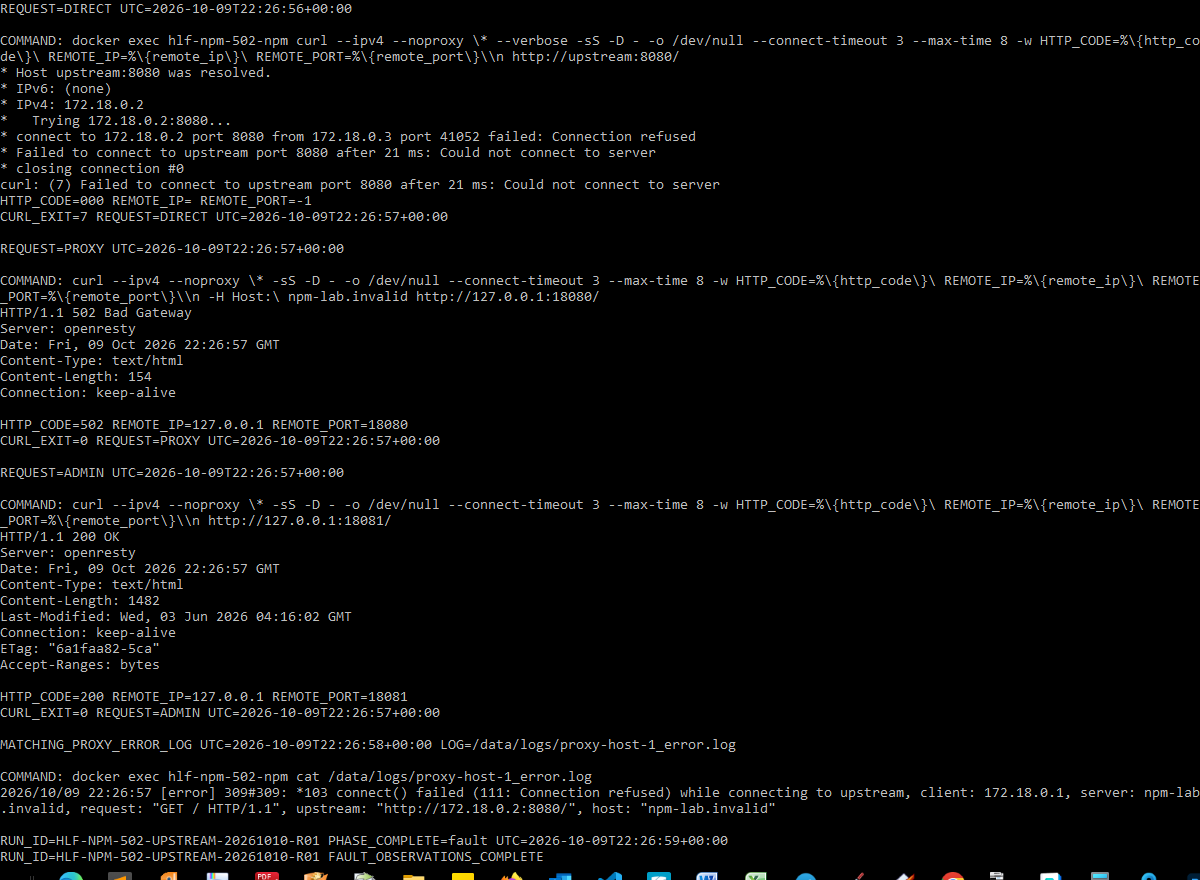
Run HLF-NPM-502-UPSTREAM-20261010-R01 tested one specific diagnostic distinction from this page. The evidence below shows the topology, measured before/during/after states, and the strongest terminal captures rather than treating screenshots alone as proof.
- Status
- Virtual Lab Tested
- Tested
- Environment
- Isolated Debian 12.15 VM on QEMU 11.1.0 with rootful Docker Engine 29.8.2, Compose v5.6.0 and Nginx Proxy Manager 2.15.1 (OpenResty 1.29.2.5). NPM 172.18.0.3 and an upstream Python 3.14.8 HTTP server 172.18.0.2:8080 shared one user-defined Docker bridge; NPM HTTP and admin were published to the VM loopback only.
Test topology
Proxied request (same URL and Host header in every phase)
Direct diagnostic control from the NPM container
Independent NPM health control
Measured results
| Probe | Healthy baseline | Listener stopped | Listener restored |
|---|---|---|---|
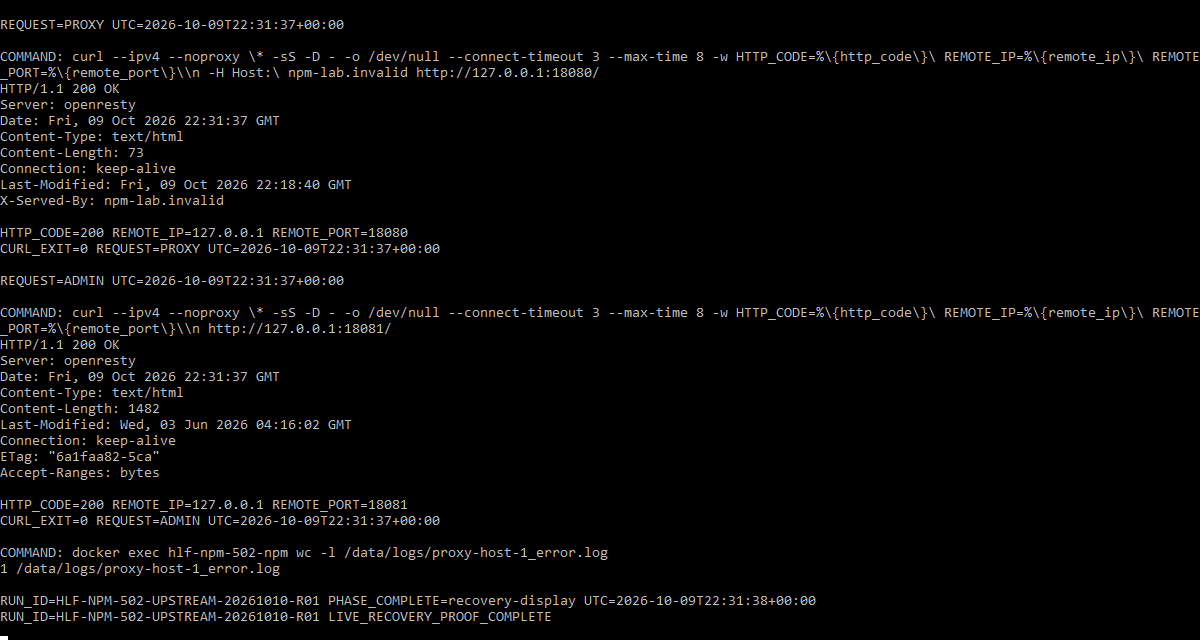
| Same NPM proxy URL | HTTP 200 / curl 0 | HTTP 502 / curl 0 | HTTP 200 / curl 0 |
| Direct request inside NPM | HTTP 200 / curl 0 | Connection refused / curl 7 | HTTP 200 / curl 0 |
| NPM admin HTTP | HTTP 200 | HTTP 200 | HTTP 200 |
| Upstream HTTP listener | PID 7 on TCP 8080 | Listener absent; PID 7 exited -15 | PID 60; same command and port |
| Proxy-host error log | No matching error | One matching connection-refused line | No new error; total still 1 |
What this experiment shows
- The test kept the proxy URL, Host header, Docker container identities, network attachment and NPM proxy-host configuration fixed, isolating the changed upstream listener as the fault.
- The failed direct curl ran inside NPM's own network namespace, not on a separate host whose routing might differ.
- During the fault, the proxy returned HTTP 502 while the admin endpoint continued to return HTTP 200; a working admin UI and an 'Online' proxy-host record did not establish upstream liveness.
- The nginx error named the translated upstream 172.18.0.2:8080 with 'connect() failed (111: Connection refused)', matching the direct curl failure and absent TCP listener.
- The original upstream child stopped via SIGTERM while both containers remained running. Restarting the identical listener command restored HTTP 200 without editing NPM or recreating containers.
Key evidence captures
What this does not prove
This is one deliberately induced refused-upstream TCP listener fault on Nginx Proxy Manager 2.15.1 in an isolated Docker bridge, not a reproduction of every NPM 502 cause. The experiment did not test DNS or forward-hostname failures, wrong ports, localhost namespace mistakes, upstream TLS/scheme negotiation, routing or firewall restrictions, Cloudflare, real LAN devices, Docker Desktop, WSL, other NPM versions, production applications, or hardware. A connection-refused log alone does not uniquely prove that an application is stopped; in this experiment the listener state and controlled recovery established the cause. Host and guest timestamps differed by approximately three minutes, and the second screenshot is a later live recovery recheck.
The complete reviewed bundle includes the full command logs, recovery evidence, additional captures, environment details, and integrity hashes. This article shows only the evidence that helps explain the diagnostic result.
Editorial verification
The citations beside technical claims show their evidence. HomeLabFix chooses the diagnostic order and states where the evidence stops supporting a conclusion.
- Author and technical editor
- Andrey Tretyak
- Verification basis
- The cited vendor or project documentation plus the page-specific reasoning above.
- Hands-on status
- A scoped virtual-lab reproduction is documented above. Other claims remain documentation- and reasoning-based unless separately tested.
- Lab verification
- Virtual Lab Tested · run HLF-NPM-502-UPSTREAM-20261010-R01 · · See topology, measurements, evidence captures, and scope.
- Correction path
- Report a source change, scope error, or reproducible contradiction.
Sources
Links were reviewed on 2026-10-10. Reachability and automated validation do not replace editorial verification of each claim.
- Nginx Proxy Manager guide: forwarding and setup
Nginx Proxy Manager · Tier A · accessed 2026-09-10 - Nginx Proxy Manager advanced configuration
Nginx Proxy Manager · Tier A · accessed 2026-09-10 - Module ngx_http_proxy_module: proxy_pass and upstream handling
NGINX · Tier A · accessed 2026-09-10 - Issue 3961: 502 Bad Gateway with upstream TLS handshake and connection failures
Nginx Proxy Manager · Tier B · accessed 2026-09-10 - Issue 633: unresolvable forward hostname in proxy configuration
Nginx Proxy Manager · Tier B · accessed 2026-09-10 - Nginx Proxy Manager cannot reach Docker containers, localhost returns 502
Docker Community Forums · Tier C · accessed 2026-09-10 - NPM v2.15.1 proxy host template — per-host access and error logs
Nginx Proxy Manager · Tier B · accessed 2026-09-27 - Networking overview
Docker · Tier A · accessed 2026-09-11 - docker container exec — run a command in a running container
Docker · Tier A · accessed 2026-09-27